For as long as AI agents have been able to "browse the web," they have done it in a sandbox: a headless browser somewhere in a container, freshly spawned, logged in to nothing, remembering nothing, looking nothing like the web you actually see. It works for scraping public pages. It falls apart the moment a task involves your accounts, your tabs, or your judgement.
The upcoming Agent Zero Chrome Bridge changes that. It is a Chrome extension, paired with a small native companion on your desktop, that lets Agent Zero work inside the Chrome you already use, with your logins, your sessions and your extensions, while keeping every consequential decision in your hands.
This is not "AI in a browser." It is your browser, with an agent that has to ask before it acts.
Why this matters
Agent Zero already has a capable built-in browser tool. So why build a bridge into a real Chrome profile?
Because the interesting part of the web lives behind authentication. Your dashboards, your inbox, your company's internal tools, the SaaS apps you pay for, the research databases your organisation subscribes to. None of that is reachable from a disposable headless browser without copying credentials around, and copying credentials into an agent is exactly the thing most people, rightly, refuse to do.
The Chrome Bridge sidesteps the problem entirely. The agent never receives a password. It operates tabs inside a Chrome profile that is already signed in, on your machine, in plain view. You watch what it does, and you approve what counts.
For users, it means handing off real work instead of demos. For Agent Zero as a platform, it means the browser tool stops being a peripheral and becomes a first-class surface, one that respects the boundary between the agent's container and the human's computer.
What you can hand off
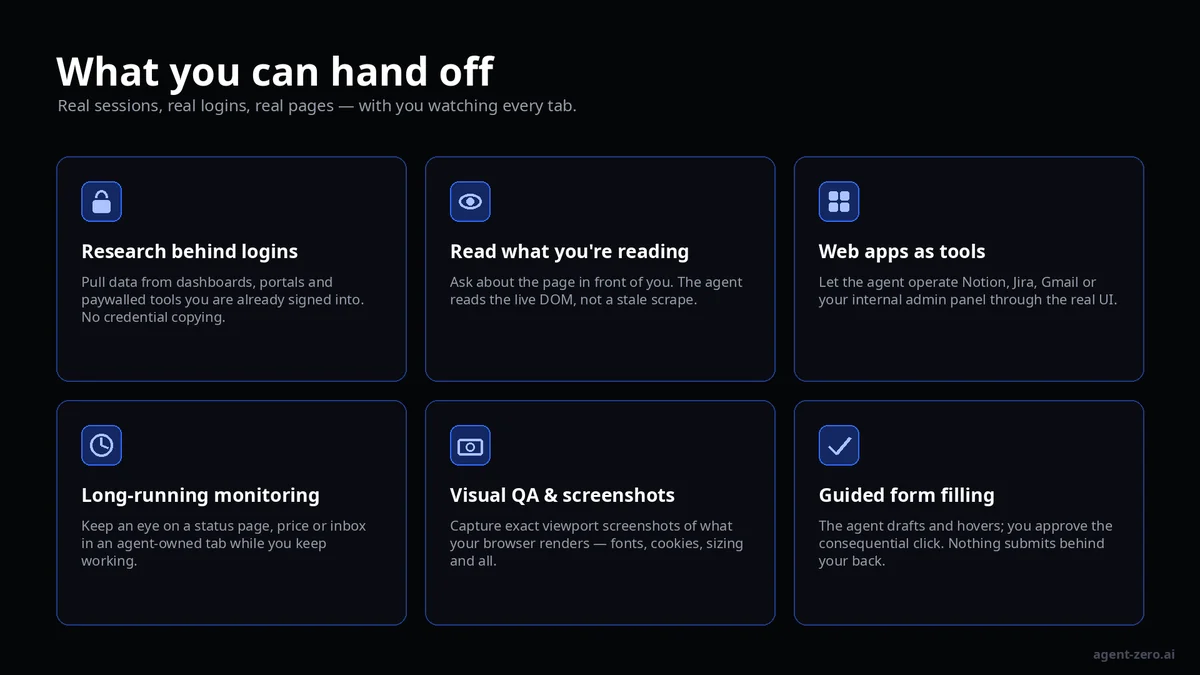
Research behind logins
Pull numbers out of an analytics dashboard, gather tickets from a support portal, or summarise a paywalled report you already subscribe to. The agent reads the live page as you see it, no credential sharing, no scraper maintenance.
Ask about the page in front of you
The extension's side panel projects your Agent Zero chats into Chrome. Open a dense spec, a long thread, or an unfamiliar admin screen and ask the agent what it means, what changed, or what to do next. It reads the live DOM, not a stale copy.
Web apps as tools
Most of the software we use has no API worth speaking of, or one you are not allowed to touch. The Bridge lets the agent operate the real UI: create the Jira ticket, draft the Notion page, prepare the Gmail reply, walk through the internal form that only exists as a web page.
Long-running monitoring
Agent-owned tabs live in their own blue Chrome tab group. Leave one watching a status page, a price, or an approval queue while you keep working in your other tabs. Your tabs are never touched, shared or closed.
Visual QA and real screenshots
A headless browser renders with its own fonts, no cookies, no extensions and a default viewport. Your Chrome renders what your customers actually see. The Bridge captures exact viewport screenshots from the agent's own tab and streams them back to the chat.
Guided form filling
The agent can navigate, read, hover and fill; you approve the click that matters. Nothing is submitted, purchased or sent behind your back.
How the bridge is wired
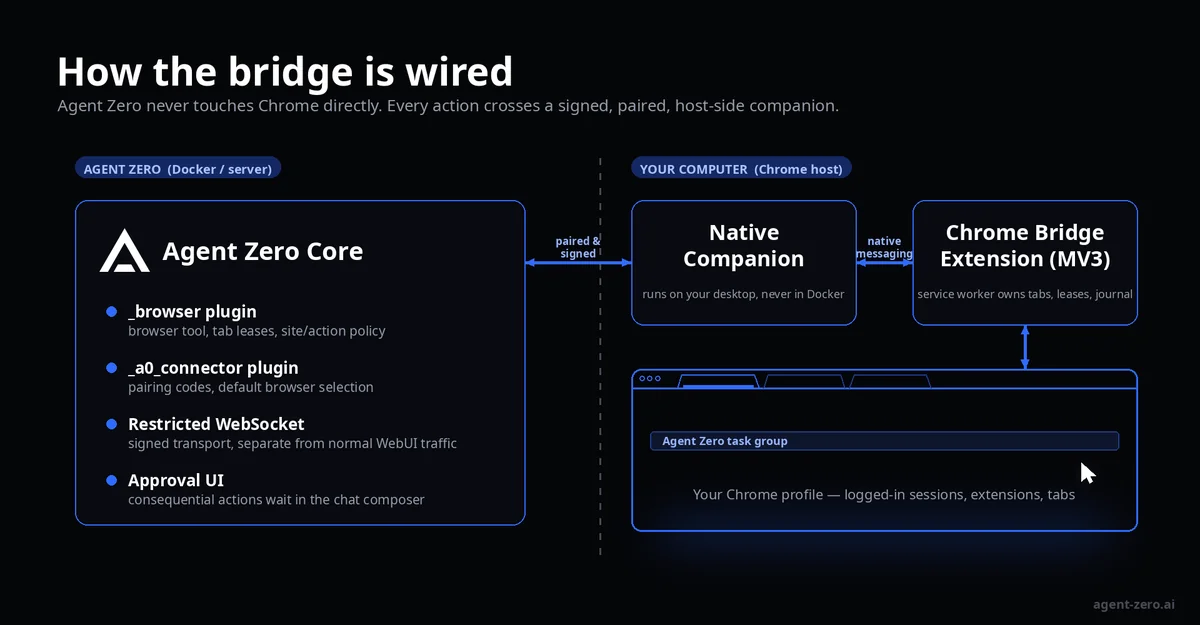
The design is deliberately split across a hard boundary.
| Component | Where it runs | What it owns |
|---|---|---|
Agent Zero Core (_browser and _a0_connector plugins) |
Your Agent Zero instance (Docker or server) | Browser tool, tab leases, site and action policy, pairing codes, approval UI in the chat composer |
| Native companion | Your desktop, never inside the container | Signed transport between Agent Zero and Chrome via native messaging |
| Chrome Bridge extension (Manifest V3) | Your Chrome profile | Tab groups, exact tab leases, page helpers, durable write-ahead journal, side panel |
Agent Zero never speaks to Chrome directly. Every request crosses a paired, signed, restricted WebSocket to the companion, which relays it over Chrome's native messaging port to the extension's service worker. The transport is kept apart from ordinary WebUI traffic: restricted companion connections are excluded from normal broadcasts, replay buffers and diagnostics, and are re-validated before every delivery.
A few consequences fall out of this:
- Docker stays Docker. If Agent Zero runs in a container, the companion still installs on your normal desktop. A remote server does not own your local Chrome, and it never will.
- Pair once, use everywhere. Pairing is remembered for the Chrome profile across chats and updates, and you can set the paired browser as Agent Zero's default so every conversation can use it.
- The extension holds no keys. It never stores an Agent Zero API key, never writes conversation bodies to extension storage, and keeps only digests of identities and redacted URL identity in its local ledger.
Built to ask, not to assume
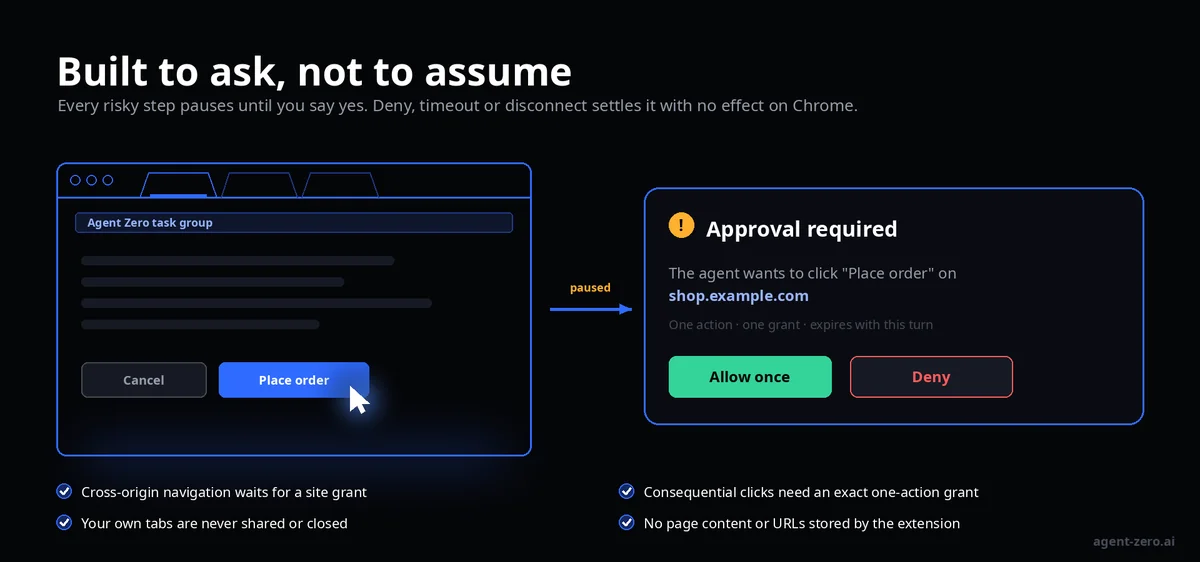
Most browser agents optimise for autonomy. The Chrome Bridge optimises for bounded autonomy. The safety model in the current main branch is explicit about what the agent may do and, more importantly, about what settles a request when you say no.
| Situation | What happens |
|---|---|
| Agent wants to navigate to a different origin | The operation pauses in waiting_approval and emits a redacted challenge.required. It proceeds only with a live, turn-scoped site grant. |
| Agent wants to perform a consequential click (submit, purchase, send) | Requires an exact one-action grant from the server. The extension re-validates its fingerprint of the target element before every mouse phase. |
| You deny, the grant expires, the connection drops, or the turn finalises | The operation settles with no effect on Chrome. |
| You take over the tab | Any in-flight screenshot transfer or action is aborted. |
Actions are gated individually, and the current tested slice is intentionally narrow: bounded semantic content reading, challenge-gated navigate, opaque-reference scroll, ref-targeted trusted hover, viewport-only screenshot, and a bounded empty-field type lane. Every one of them is bound to an exact document, an exact tab lease and the current generation of the connection.
Even the illuminated cursor you see moving across the page is deliberately non-intercepting: it shows you where the agent is looking without stealing a single event from you.
To avoid per-site prompts you can enable All websites in Agent Zero's Browser settings, but consequential actions still require their own approval. The extension will not edit Chrome profiles, push enterprise policies or disable any safeguards.
Setup: three steps, no build tools
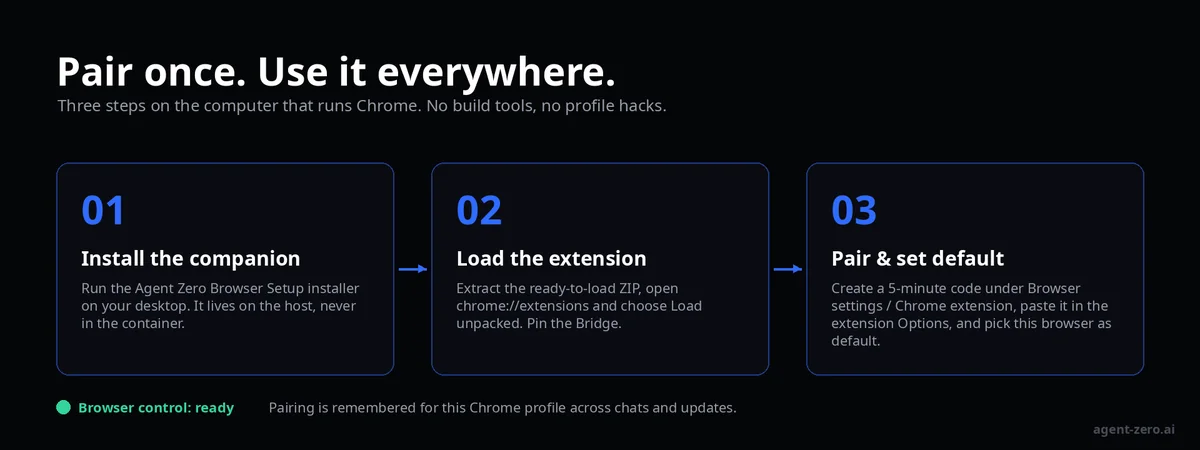
Everything happens on the computer that runs Chrome.
- Install the companion. On macOS, run Agent Zero Browser Setup and choose Install browser companion. No administrator password, no Gatekeeper workarounds.
- Load the extension. Download the ready-to-load ZIP from the releases page, extract it to a permanent location, open
chrome://extensions, enable Developer mode and choose Load unpacked. The package ships aSTART-HERE.htmlwalkthrough for each operating system. - Pair and set default. In Agent Zero, open Browser settings → Chrome extension and create a code (valid for five minutes). Paste it into the extension's Options page together with your WebUI address, choose Pair this browser, then mark it as Agent Zero's default browser.
Wait for Browser control to report ready. Pairing saved on its own is not enough; the companion has to be reachable too.
Updating later is a matter of replacing the extension folder in place and clicking Reload. No re-pairing, no new codes.
Where things stand
The Chrome Bridge is upcoming, and the project is unusually candid about what that means. As of the current main branch of the extension repository and the open Core pull request:
| Piece | Status |
|---|---|
| Extension package | v0.1.1 pre-store release, ready to load unpacked |
| Chrome Web Store listing | Draft, not yet published |
| Native companion, macOS 13+ (Intel and Apple Silicon) | Signed and notarized installer available (2.12.3) |
| Native companion, Windows | Installer and platform verification incomplete |
| Native companion, Linux x86-64 / ARM64 | Candidate builds exist, production installer not released; Snap/Flatpak Chrome not supported |
| Agent Zero Core integration | PR #1877, open for review against the ready branch |
| Agent Zero CLI integration | a0-connector PR #26 |
The Core PR is substantial, roughly 25,800 lines of production source across 93 files, yet it touches only seven shared framework files, and those changes are limited to authenticating restricted principals, isolating their traffic and giving plugins the lifecycle hooks they need. Feature logic lives in the _browser and _a0_connector plugins. Nothing in agent.py, initialize.py or models.py changes.
That discipline is the point. The Chrome Bridge is being built as a plugin that respects the platform, not as a fork that redefines it.
The bigger picture
Agent Zero has always been about giving a general-purpose agent real tools in a real environment rather than a toy sandbox. The Chrome Bridge extends that philosophy to the one environment that matters most for everyday knowledge work: the browser you are already in.
It does so without asking you to trust the agent with your passwords, without letting it wander across origins unannounced, and without pretending that Windows and Linux are done before they are.
Your browser. Your agent. Your approval.
Links
- Extension repository: https://github.com/agent0ai/agent-zero-browser-extension
- Setup guide: https://github.com/agent0ai/agent-zero-browser-extension/blob/main/docs/INSTALL.md
- Agent Zero Core integration PR: https://github.com/agent0ai/agent-zero/pull/1877
- Native companion and CLI PR: https://github.com/agent0ai/a0-connector/pull/26
Status details reflect the extension repository main branch (v0.1.1, 6 September 2026) and PR #1877 as of 8 September 2026.