Welcome to How the hell do I... with Agent Zero, a new series where we take one thing people keep asking about, whether it lives in the WebUI, the Launcher, or the A0 CLI, and actually show you how to do it. No hand-waving. Real paths, real buttons, real JSON.
We are starting with a problem everyone hits about a week after they discover the Community Plugin Hub.
The problem: usr/plugins becomes a junk drawer
Agent Zero is plugins all the way down, and the Hub now has more than a hundred of them. That is wonderful right up until you have installed fourteen, forgotten where six came from, cannot remember which ones you scanned, and have no idea whether the Slack bridge is supposed to be active for your hacker profile or for every chat you open.
The folder tells you nothing. Each plugin is just a directory in usr/plugins/ sitting next to the others, with no record of its source, its pinned revision, or why it is there.
Plugin Nester by TerminallyLazy fixes that. It is a plugin that manages other plugins: it installs them from the Hub, a Git URL, or a remote ZIP; scans them before they are ever linked into your agent; records exactly where each one came from; groups them into bundles per project or per agent profile; and cleans up after itself completely when you remove one. And because this is Agent Zero, the agent can drive the whole thing through a tool.
Here is how the hell you use it.
What it actually does (the 60-second version)
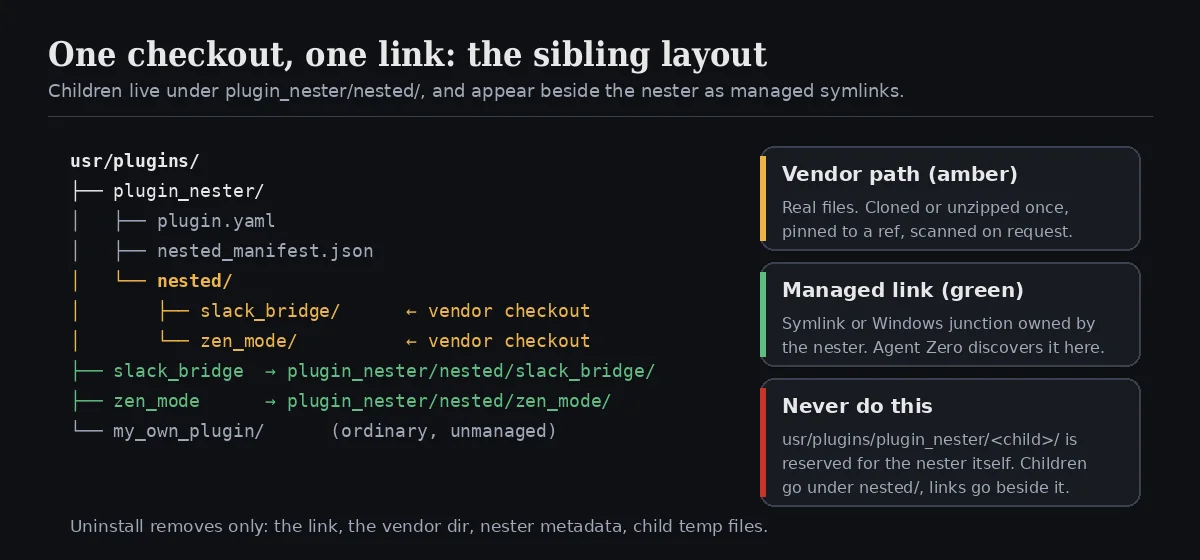
Every plugin Nester installs is called a nested child. A child is checked out once into a vendor folder owned by the nester, and then exposed to Agent Zero through a managed symlink (a directory junction on Windows) that sits beside the nester like any ordinary plugin.
That one design decision buys you a lot:
- A child is still a normal plugin. Agent Zero discovers it by its own
plugin.yaml. The Switch panel, per-project and per-profile activation, README and Config buttons all work exactly as they would for anything else. - Management state lives in the nester, not the child. The nester's manifest remembers the source, the ref, whether it was scanned, and which bundles it belongs to. The child's manifest stays the source of truth for its own name and version.
- Uninstall is bounded. Removing a child deletes the link, the vendor directory, the nester's metadata and the child's temp files. It never touches unrelated files, core Agent Zero, or user data outside the child.
One rule to burn into memory: never put a child at usr/plugins/plugin_nester/<child>/. That path is reserved for the nester itself. Children live under plugin_nester/nested/<child>/, and their public entry is always the managed link at usr/plugins/<child>.
Step 1: Install Plugin Nester itself
Nester is a regular user plugin, so it installs like one. The important detail is the folder name: the plugin imports itself as usr.plugins.plugin_nester, so the directory must be called plugin_nester.
cd /a0/usr/plugins
git clone https://github.com/TerminallyLazy/agent-zero-plugin-nester plugin_nester
Then open Settings → Plugins in the WebUI and hit Refresh. Plugin Nester appears in your custom plugins with its own thumbnail. On first load its install hook creates an empty manifest; if you ever reinstall, an existing manifest is left alone.
If you prefer to let Agent Zero do it, just ask. "Clone Plugin Nester from GitHub into /a0/usr/plugins/plugin_nester and refresh the plugin list" is a perfectly good instruction, and it works the same from the WebUI, the Launcher, or the A0 CLI, because the agent is doing the work either way.
Step 2: Set your policy before you nest anything
On the Plugin Nester card, click Config. You get three controls:
| Setting | Default | What it does |
|---|---|---|
Plugin Hub source (hub_index_url) |
The signed agent0ai/a0-plugins generated index |
Where the manager browses and resolves Hub keys. Read-only in this panel; override it in the plugin configuration if you run a private index. |
Repair managed links automatically (auto_repair) |
true |
Recreates a missing managed link for any active child after a plugin change. It never revives removed children or overwrites a colliding folder. |
Automatic update policy (auto_update_policy) |
notify |
never keeps installed revisions until you act. notify reports available updates and waits for you. auto applies updates once the configured checks pass. |
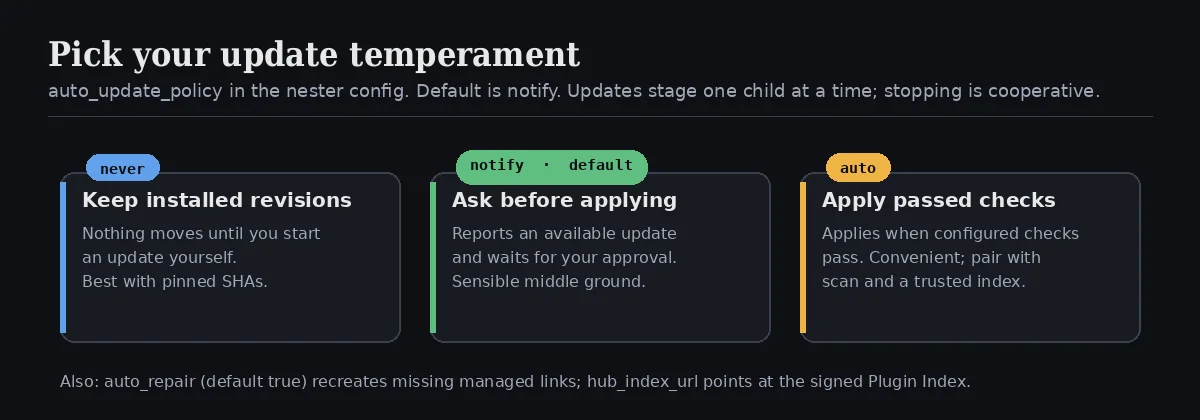
Our recommendation for anyone running Agent Zero on a machine they care about: keep notify, and when you add children, pin them to a full commit SHA. A branch or tag can move after you first installed it. A 40-character SHA cannot.
Step 3: Open the manager and nest something
There are two doors into the Plugin Nester Manager:
- Plugins → Plugin Nester → Open. This always works, including before you have nested anything.
- The Nested children shelf. Once you have at least one child, the main Plugins modal grows a shelf labelled Managed by Plugin Nester with every child's thumbnail, key and health grouped by bundle, and a single Manage button. That button is the shelf's one entry point back into the manager.
Inside the manager, the Plugin Hub tab lists everything from your configured index with Popular and Recently updated views, a Filter box and a Sort control. Each card tells you whether it is Already nested, Not nested, or Managed locally (an ordinary unmanaged plugin already in usr/plugins).
The workflow is:
- Select one or more plugins.
- Leave Scan before nesting switched on. Nester's bundled scanner only understands Git sources, so the manager notes Git sources only next to it; a remote ZIP can be nested but will not get a scanner review.
- Press Continue. The manager asks where the children should go.
Pick a destination
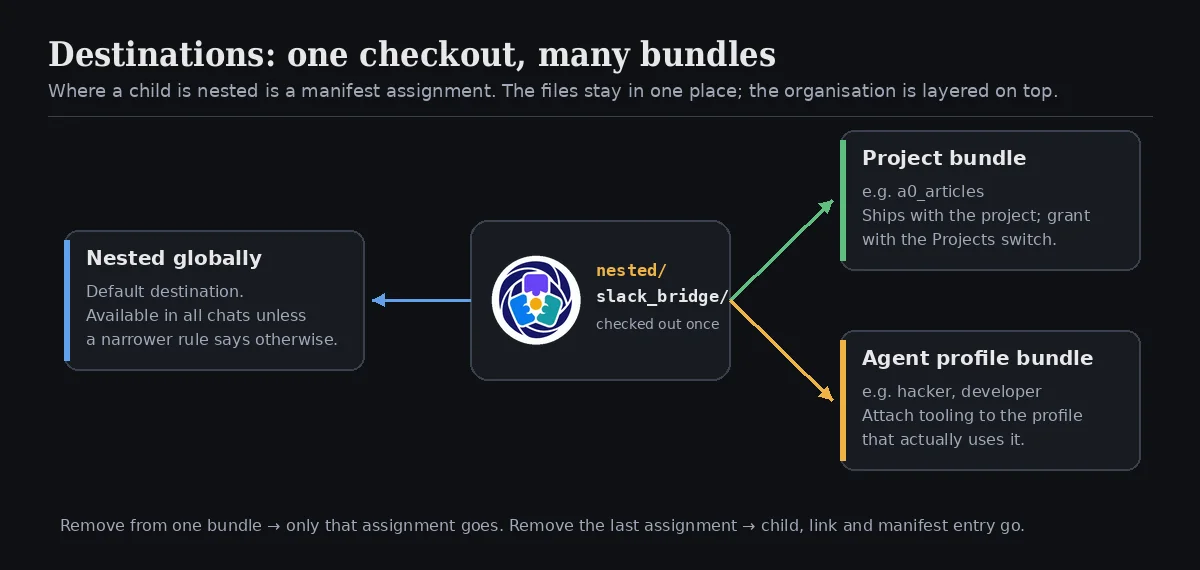
This is the part that turns Nester from an installer into an organiser. Before anything is checked out you choose a destination:
- Nested globally: the default. The child is available in all chats unless a narrower rule says otherwise.
- Project bundle: attach the child to an existing project, or create a New bundle for one. Great for tooling that only makes sense inside, say, your articles project.
- Agent profile bundle: attach the child to a profile such as
hackerordeveloper, so the tooling rides with the agent that actually uses it.
A destination is a manifest assignment, not a copy. The child is still checked out exactly once under nested/. The same child can belong to a project bundle and a profile bundle at the same time with no duplicate folders and no duplicate links.
The manager's Bundles index groups children by destination, and every child's Manage panel shows its Bundle membership alongside the normal Availability & bundles switches for All chats, Agent profiles and Projects. Bundle membership is the durable organisation layer; the switches are Agent Zero's ordinary runtime activation layer. They are separate on purpose.
Watch it work, or stop it
Installs run one child at a time under Nesting activity, showing the active child, how many are done, and each child's result. While something is in flight, the primary button turns into Stop nesting. Stopping is cooperative: the current Git or ZIP transaction is cancelled at a safe boundary, staged material is rolled back, and children that have not started stay selected so you can retry. Git clones also have a bounded timeout, so a stalled remote cannot leave the manager hanging forever.
What counts as a source (and what does not)
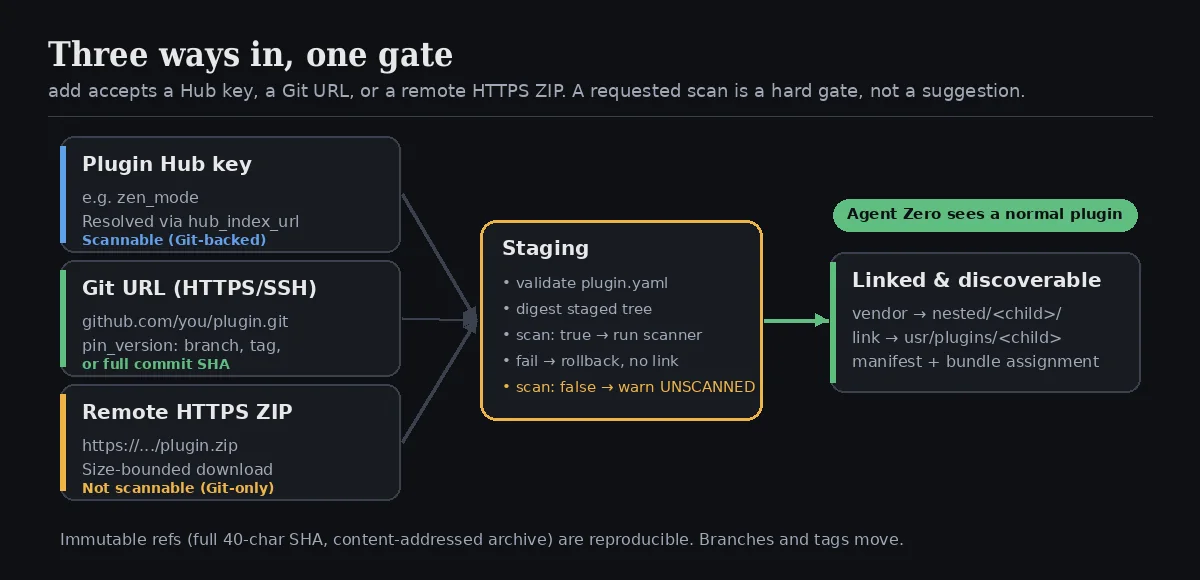
Nester accepts exactly three kinds of source:
| Source | Example | Scannable? |
|---|---|---|
| Plugin Hub key | zen_mode |
Yes (resolved through the index to its Git repository) |
| Direct Git URL over HTTPS or SSH | https://github.com/you/your-plugin.git |
Yes |
| Remote HTTPS ZIP URL | https://example.com/releases/plugin.zip |
No, Git-only scanner |
It does not accept a local ZIP upload or a local path. That is a deliberate choice: anything you install should come from a reachable, reviewable source. If you built something locally, push it somewhere first.
Whatever the source, staging always validates the root plugin.yaml and digests the staged tree before anything is linked. If you requested a scan and it fails, the install is blocked and the child is never linked. If you turned scanning off, Nester records an explicit unscanned warning rather than pretending the child was approved. Treat every third-party plugin as untrusted code until you have read it.
Step 4: Let the agent do it
Here is the fun part. Once Nester is installed, Agent Zero gains a tool called nested_plugin_manager. It takes one JSON object and returns one JSON result, and it supports five actions.
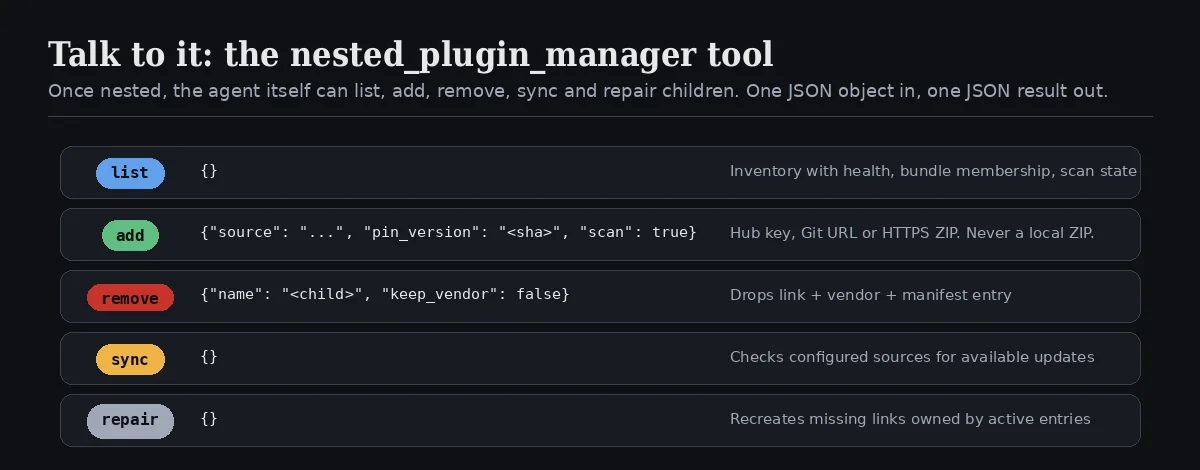
list— takes{}. Returns the inventory of active children with health, bundle membership and scan state.add— takessource(required), optionalpin_version(aliasref), optionalscan(defaultfalse). Stages, optionally scans, vendors and links a child.remove— takesname(required), optionalkeep_vendor(defaultfalse). Removes the link and manifest entry; keeps the vendor folder only if asked.sync— takes{}. Checks configured sources for available updates according to the update policy.repair— takes{}. Recreates missing links owned by active manifest entries.
Which means you can just talk to it:
Nest the
zen_modeplugin from the Hub. Scan it first. If the scan passes, tell me what it touches.
Behind the scenes the agent issues something like:
{
  "action": "add",
  "source": "zen_mode",
  "scan": true
}
Or, for a Git source you want to freeze in place:
{
  "action": "add",
  "source": "https://github.com/you/your-plugin.git",
  "pin_version": "3f2a9c1d8b7e6f5a4c3b2a1d0e9f8c7b6a5d4e3f",
  "scan": true
}
A few things the tool prompt makes the agent promise: it will never accept a local ZIP path, it will surface the one-time unscanned warning instead of presenting an unscanned plugin as trusted, and it reports helper errors without dumping tracebacks at you.
Because this is a tool, it works from wherever you talk to your agent. Type the request in the WebUI, send it through the A0 CLI from your terminal, or hand it to a scheduled task that runs sync every morning and reports what changed. Same tool, same guarantees.
Step 5: Removing, repairing, and staying tidy
Removing from a bundle. In a child's Manage panel, remove it from one bundle and only that assignment goes away, provided another bundle still owns it. Remove its last assignment and the child, its link and its manifest entry are removed together. Older removed records are simply ignored by the inventory; they never render as ghosts.
Repairing links. If a managed link goes missing, repair (or auto_repair after any plugin change) recreates it, but only for active manifest entries, and never by overwriting a folder that is already sitting at that path. Collisions are reported, not clobbered.
Updating Nester itself. Its pre_update hook deliberately leaves every child, link, vendor folder and manifest entry alone. Updating the nester never reshuffles your children.
Uninstalling Nester. Its uninstall hook walks every active child and runs the same bounded cleanup on each, then reports what it cleaned and anything it could not.
Why this is worth the five minutes
| Without Nester | With Nester |
|---|---|
| Plugins are anonymous folders | Every child records its source, ref and scan state |
| Scanning is a habit you might forget | A requested scan is a hard gate on install and update |
One usr/plugins list for everything |
Children grouped into global, project and profile bundles |
| Uninstall means "delete a folder and hope" | Uninstall removes exactly the link, vendor, metadata and temp files |
| You manage plugins | You and your agent manage plugins, from any surface |
Plugin Nester does not change what plugins can do. It changes whether you can still explain your setup three months from now, and whether the agent can help you keep it that way. In a framework where the browser, the code runner and the memory are all plugins, that is not housekeeping. That is knowing what your agent is made of.
Quick reference
Install:   git clone https://github.com/TerminallyLazy/agent-zero-plugin-nester /a0/usr/plugins/plugin_nester
Open:      Settings → Plugins → Plugin Nester → Open   (or the Nested children shelf → Manage)
Config:    hub_index_url · auto_repair (true) · auto_update_policy (never | notify | auto)
Sources:   Hub key · Git URL (HTTPS/SSH) · remote HTTPS ZIP   — never a local ZIP
Layout:    usr/plugins/plugin_nester/nested/<child>/  ←  usr/plugins/<child> (managed link)
Tool:      nested_plugin_manager  { action: list | add | remove | sync | repair }
That is Part 1. Next time in How the hell do I... with Agent Zero, we pick another thing you have been meaning to figure out and figure it out together. If there is a plugin, workflow or corner of the WebUI, Launcher or A0 CLI you want covered, tell us on X at @agent0ai.
Plugin Nester is a community plugin by TerminallyLazy, published under the license in its repository. As with every third-party plugin, read the code before you enable it.