
An answer can contain the right numbers and still leave you doing most of the work. You scan a paragraph for the total, reconstruct the comparison, find the missing constraint, and write another message to explain what should happen next.
OpenUI gives Agent Zero another way to present that work. A supplied dataset can become a dashboard with a chart and an inspectable data table. Missing preferences can become a small form. An email brief can become a designed draft with a separate review step. These interfaces live inside the existing chat, alongside a text summary and inspectable source.
The interesting part is how the plugin connects presentation to the conversation. Its default mode can build the interface from the main agent's ordinary tool call, progressively preview it, save its state, and route a later button press back through chat. Understanding that path explains both the usefulness of OpenUI and the limits of a polished-looking answer. Tool implementation Browser host
Research basis: We reviewed OpenUI 0.2.3 at
47899892f1b8, the revision listed in the downloaded Plugin Hub index on October 28, 2026. We traced the source, checked the shipped renderer, and reran its 64 frontend tests plus the documented framework/plugin selection: 143 passed and one skipped against Agent Zeroff2a5b9c9c4e. Browser checks used the actual shipped renderer with synthetic data in an isolated fixture. We made no live model calls and sent no email for this article.
The short version
- Use an interface when it improves the next decision. A chart should expose a comparison; a form should collect a missing constraint.
- The default uses the current answer. Separate UI generation and the hosted Gateway are explicit alternatives with their own model usage.
- A preview and a usable artifact are different states. Generated controls remain inert during streaming; completed artifacts still need valid components and sound underlying facts.
Start with a decision, then choose the interface
Consider a deliberately small, synthetic example. A team reports 10, 14, and 18 completed tasks across three days, against a supplied target of 50. The total is 42; eight remain. A useful answer makes that arithmetic visible, shows the daily distribution, and asks what constraint should shape the remaining work.
A compact dashboard earns its space here. The headline metric supplies the total. A bar chart shows the three counts. A data table lets the reader check the plotted values. A required form field can ask about capacity before the agent proposes a plan. These are distinct jobs, so repeating the same sentence in four decorative cards would add very little.
The shipped Chart.js wrapper supplies a data table alongside its canvas and falls back to that table if drawing fails. Its options disable chart animation, bound the data to 12 series and 500 points per series, and exclude executable callbacks. Those are concrete presentation constraints. They do not check whether the supplied figures are true or whether three observations justify a forecast. Chart component
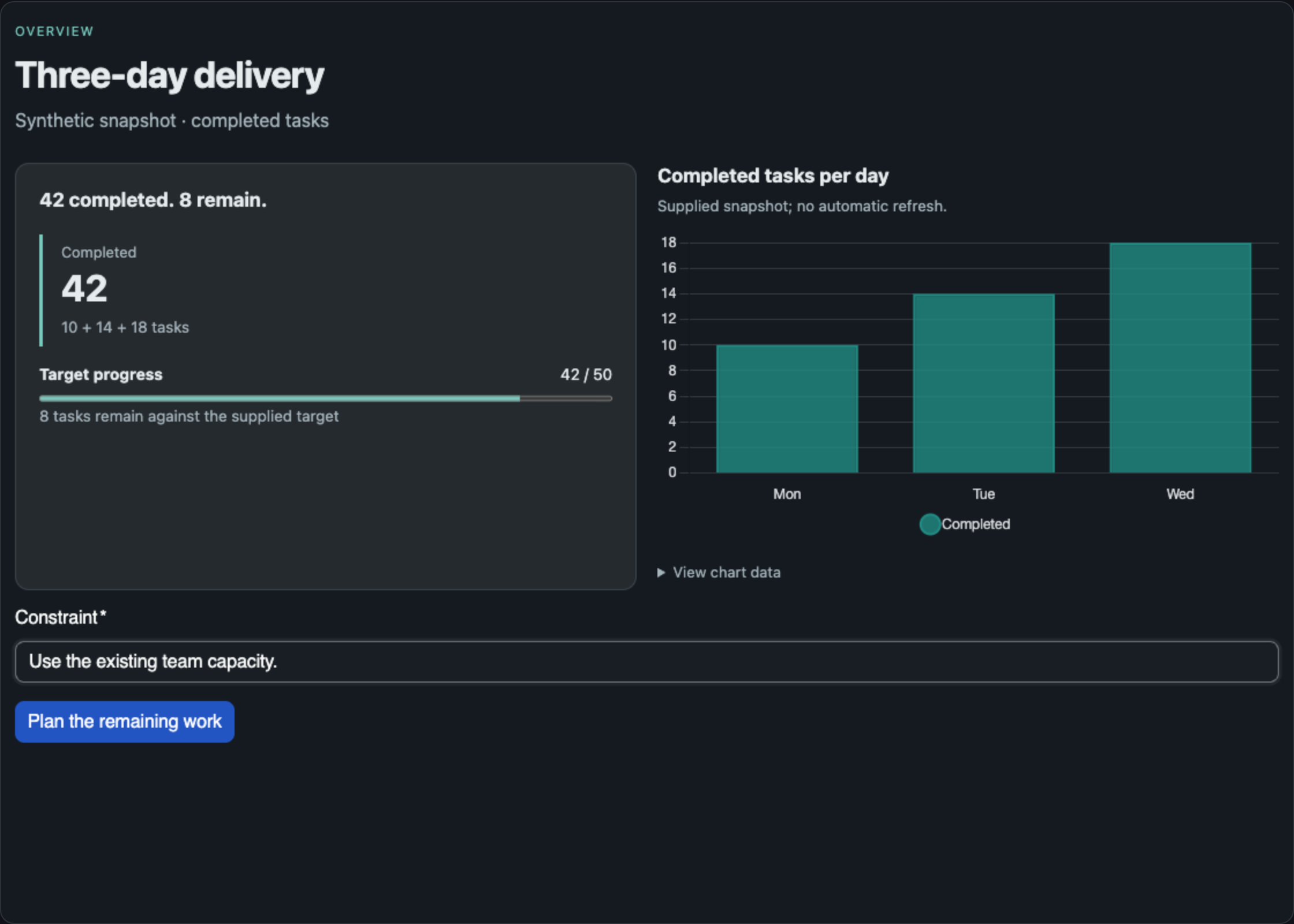
The shipped OpenUI renderer, captured in our isolated browser fixture. The figures are synthetic. This is a component demonstration, not a model-generated report or a live Agent Zero chat.
This is also a useful test of the agent's judgment. A single factual answer may be clearest as text. Several comparable options may deserve a table. A plan may need an agenda with optional detail. OpenUI's composition guidance makes those distinctions and discourages invented metrics, fake refresh controls, and unsupported booking or sending buttons. The choice remains model-driven guidance rather than a guarantee that every model will select a good layout. Composition rules and examples
One answer can produce one interface
OpenUI's default is Use current answer, stored as agent_program. The main agent supplies a bounded declarative program to the openui tool. The plugin saves that program as an artifact and the local renderer interprets it using the shipped component library. Rendering this answer does not require a second UI-generation inference. The ordinary main-model call still has whatever cost and data handling apply to the configured provider. Default configuration Configuration helper
| Generation mode | Where the program comes from | Additional UI-generation call |
|---|---|---|
| Use current answer | The main agent's ordinary tool arguments | None |
| Generate separately | A new pass using the selected Main or Utility model | Yes |
| OpenUI Gateway | An explicitly configured Gateway request | Yes |
This distinction matters more than the word “local.” The renderer is bundled locally. Inference can still use a remote model. The separate-generation path has its own model call, while Gateway requires explicit configuration and is not a silent fallback when the default path struggles. Generation implementation
The component contract also matters. The reviewed release declares 103 general UI components under a0-openui@3 and 44 email components under a0-openui-email@1. General programs use Stack as their root; email programs use EmailTemplate. These are specific schemas with positional signatures, not a license to paste arbitrary React or copy a superficially similar demo from a different design system. Library definitions Generated contracts
Streaming shows progress before it grants interaction
Current-answer streaming observes the incoming tool arguments without executing a partial tool call. A prefix reader extracts a growing program only from a supported, unambiguous OpenUI call with an explicit surface. The implementation handles incomplete string escapes, rechecks decoded text through secret filtering, and stops previewing an invalid or changing envelope. Unsupported or buffered streams can simply finish through ordinary completion. Stream reader and preview lifecycle
The preview is saved with status: generating. The renderer wraps its contents in an inert region and rejects state updates and conversation actions until the status becomes complete. Cancellation preserves an interrupted, non-interactive preview. A partial chart can display an incomplete-data placeholder while its series is still arriving. Renderer Partial chart handling
After the ordinary tool call passes the plugin's ownership, argument, size, and asset checks, it can promote the same preview into a completed artifact. The program does not need to be copied into a second, unrelated result. That continuity makes the preview useful: what the reader watches developing becomes the artifact they can reopen. Preview adoption
“Complete” nevertheless describes the tool/artifact lifecycle. It does not certify the answer's facts, and the backend does not prove every OpenUI expression will render successfully. The browser still parses the program against its component contract. An invalid composition can produce diagnostics and a text fallback; Repair starts an explicit new conversation request. This separation keeps a rendering failure from becoming a hidden claim of success.
A button can ask the agent to continue
In the synthetic dashboard, the follow-up button asks for a plan for the remaining eight tasks. Its job is to carry the reader's constraint into the next message. The renderer has no general tool provider, and its supported conversation action is continue_conversation, exposed to programs through @ToAssistant. Renderer action boundary
The native host saves state, checks that the artifact is still current, and calls Agent Zero's normal sendMessage path. The visible message contains the submitted values and an artifact reference. Existing composer input is preserved. Rapid duplicate clicks are suppressed, while an intentional later retry remains possible. A form therefore becomes a structured conversational turn; it does not give generated source a hidden route to arbitrary tools. State and action handling
That is a useful discipline for designing forms. Collect the missing constraint, then make the next request understandable in plain language. “Plan with this capacity” is a meaningful continuation. A button labeled “Approve purchase” would be misleading if its actual behavior only sends a message asking the agent what to do.
The answer has a lifecycle after the first render
OpenUI stores the source and form state in bounded chat data; log entries carry descriptors and references. Program revisions and state revisions are separate. A stale form cannot silently overwrite a newer version of the artifact or another saved state update. Reopening also checks the owning chat, active agent profile, plugin policy, and linked history entry. Artifact storage and revision checks
There are practical limits: a 64 KiB program, 8 KiB of form state, and at most 32 artifacts within a 1 MiB chat artifact store. These favor focused interfaces. A compact report with a clear question fits the design better than turning a chat into an unbounded application database.
The saved artifact also names its component-library digest. The host checks that digest before rendering; an unknown contract falls back to the summary and a request to regenerate. Chat export preserves the artifact data, but continued usability still depends on the retained history, profile, and supported renderer contract. Saving a program is not a promise that every future renderer will interpret it forever.
For repeated presentation, ComponentTemplate offers a smaller reuse mechanism. A quoted layout can accept scalar values through @Prop and be reused within the program. It remains a presentation template: it cannot nest templates, contain forms or actions, install React components, or execute JavaScript. Keep the real form in the enclosing program. Template implementation
Email makes the review boundary visible
The email surface uses its own component library and preview policy. It can produce designed HTML and plain text, while native Email studio controls handle recipients, subject, export, and reviewed sending. A model-generated email component cannot invoke the send API through the renderer's action bridge. Email export Native mail API

Review & send prepares the exact recipients, subject, sanitized HTML, and plain-text content for inspection. The final Send email action is separate. Its review token expires after ten minutes and binds the artifact, source hash, revision, active agent/profile, and sending account. Changing the source or account invalidates the old review. Closing the review sends nothing. Review preparation and validation
Before SMTP begins, the backend exclusively creates and flushes a durable receipt for that chat/artifact identity. A repeat request sees the existing receipt instead of submitting again. If the connection becomes uncertain during transmission, the attempt stays recorded; the plugin does not automatically retry. SMTP acceptance is reported separately from final delivery, and partial refusals remain visible.
The scope of this protection deserves precision. It guards another attempt from the same artifact on the same installation. A newly generated copy is a different artifact. It is not a universal guarantee that identical email can never be sent twice. Delivery receipts also live outside chat snapshots, under /a0/usr/openui/deliveries/, and survive chat deletion. They retain the submitted content and outcome so chat rollback cannot erase the duplicate-send fence. Receipt identity and storage
Connected inbox viewing reuses Agent Zero's enabled IMAP integration. The reviewed reader selects the Inbox read-only, uses BODY.PEEK, and returns bounded text to the model. This is a specific IMAP/SMTP integration; an arbitrary Gmail or Outlook connector does not automatically become a supported mailbox. Attachments, provider-side draft saving, archiving, deletion, and mark-read operations are outside this release's feature set. Mailbox implementation
Local presentation still has data paths
The visual renderer runs in an opaque-origin sandbox with scripts limited to its shipped assets and JavaScript network connections blocked. Its image components can still load accepted HTTPS image URLs directly in the reader's browser. They use anonymous cross-origin loading with a no-referrer policy and supply alt-text/source-link fallbacks when embedding fails. Those requests still contact the image host; a source link records provenance rather than granting reuse rights. Host sandbox Image handling
Email previews block remote images. Exported HTML can retain supplied URLs and may load them when opened elsewhere. Meanwhile, any selected mailbox content used to ask the agent for a reply enters the ordinary chat/model path. “Local renderer” is therefore a description of one part of the architecture, not a description of every data flow.
A practical first run
Install the published ZIP through Plugins, enable OpenUI for the intended agent, and confirm that generation mode is Use current answer. The release includes the renderer, contracts, and asset manifest; its install hook checks those files without downloading frontend packages. Release and installation Asset verification
Start with a small supplied dataset and a request such as:
These synthetic daily counts are 10, 14, and 18 completed tasks; the target is 50. Show the total, the daily comparison, and the underlying values. Ask for my capacity constraint before proposing the remaining work. Use only these figures.
Check the arithmetic and the table before admiring the layout. Try submitting the empty required field, then supply a constraint and inspect the resulting conversation turn. Reopen the artifact and check its saved state. For email, begin with an explicit draft-only request and inspect HTML/text export before considering a sending workflow.
What our checks established
The pinned source passed 64 frontend tests. The documented framework/plugin selection produced 143 passed and one skipped. The skipped selection required a Playwright browser dependency absent from that isolated Python environment; separate browser checks used the existing local Chrome runtime. Backend coroutine tests used a small test-only stdlib adapter because the image lacked pytest-asyncio. No dependencies were installed. Release test selection and limits Streaming and artifact tests
In the actual shipped renderer, our synthetic dashboard displayed the supplied values. An empty required field produced no conversation action; a completed form produced one action event in the isolated parent fixture. Setting the artifact to generating made its controls inert and produced no additional action. The narrow viewport retained its form and avoided horizontal overflow. This checks component behavior; it does not establish live model selection, end-to-end chat persistence, mailbox acceptance, or universal email-client compatibility. Representative rendering tests Delivery regression tests
The interface earns its place when it makes the next judgment easier: inspect the numbers, supply the missing constraint, or review the exact draft. OpenUI provides the presentation and lifecycle around those judgments. The quality of the underlying work still depends on the evidence the agent brings to them.
Sources
- OpenUI 0.2.3 source, TerminallyLazy; reviewed at
47899892f1b8. - Component contracts, current-answer streaming, and artifact lifecycle.
- Renderer, native host, and reviewed delivery.
- Validation record and Agent Zero core.
The motion illustrations are original. The renderer capture uses synthetic data and the pinned plugin's actual built assets. No live model interaction or email sending is depicted as an observed result.