
TypeSafe AI · Jev
Ask Jev typed questions using the official TypeSafe SDK. Batch choices, yes/no probabilities, and rubric scores, with probability cards in chat and the official TypeSafe skill included.
README
TypeSafe AI for Agent Zero
Ask Jev focused questions and get typed answers with probability cards in Agent Zero's chat. One typesafe_query call can combine Choice, Noul, Score, and Box questions over the same text and images.
This community plugin uses the official TypeSafe Python SDK and includes the official TypeSafe agent skill, unchanged with its MIT license. It is not an official TypeSafe or Agent Zero product.
Settings
| Setting | Default | Purpose |
|---|---|---|
| API key | Empty | Masked field with reveal control; overrides the fallback key. |
| Model | jev-1.14.0 |
Jev version available to your account, with image and Box support. |
| Request timeout | 30 seconds | Per HTTP attempt, from 1 to 300 seconds. |
The fallback is TYPESAFE_API_KEY from Agent Zero's secret store (including project secrets), then the framework's process environment. Get a key from the TypeSafe console. Settings support project and agent-profile scopes. Keys entered here are stored in Agent Zero's local plugin configuration; do not share config.json or runtime backups. The repository excludes runtime configuration and credentials.
Only the explicit state, questions, and attached image bytes are sent to TypeSafe. Requests use your account and may incur TypeSafe usage charges. API keys are never tool arguments or result fields. The SDK retries transient failures once, within its retry budget; authentication and validation errors are returned to the agent without exposing provider response bodies.
Requests enable TypeSafe's experimental longer-context and image features with the HTTP headers TypeSafe-Danger-Zone-Long-Context: true and TypeSafe-Danger-Zone-Images: true. Provider limits still apply; the plugin does not truncate state.
The plugin uses the official Python SDK 0.7.5, including native Image assets, multipart uploads, and typed Box questions and answers. Jev 1.14.0 is the default for every request; legacy jev-latest and jev-preview settings resolve to 1.14.0. Explicit version pins are honored. The actual model appears in every result.
Use
Ask Agent Zero:
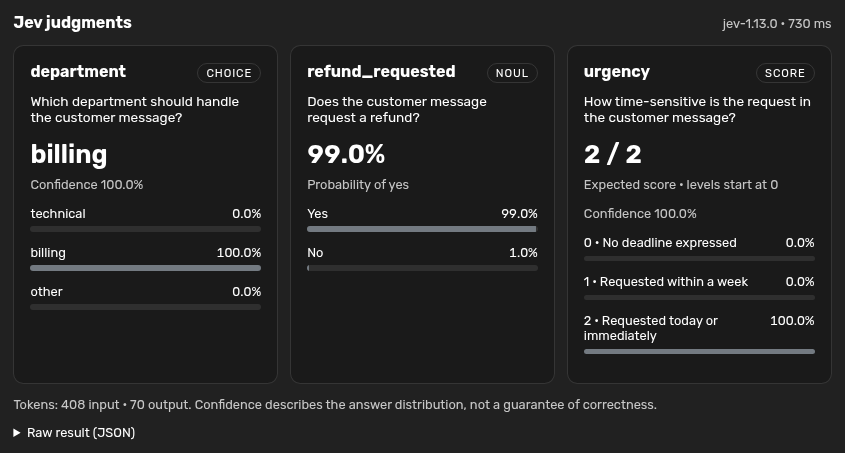
Use Jev to classify this message as billing, technical, or other, check whether a refund is requested, and score its urgency in one call: “I was charged twice. Please refund the duplicate today.”
Or call typesafe_query with:
{
  "state": {"message": "I was charged twice. Please refund the duplicate today."},
  "questions": {
    "department": {
      "type": "choice",
      "instructions": "Which team should handle `message`?",
      "criteria": {"billing": "Payments and refunds", "technical": "Software problems", "other": "Neither fits"}
    },
    "refund_requested": {"type": "noul", "instructions": "Does `message` request a refund?"},
    "urgency": {
      "type": "score",
      "instructions": "How time-sensitive is the request in `message`?",
      "criteria": ["No deadline", "Within a week", "Today or immediately"]
    }
  }
}
Expand the JEV process step to see result cards, distributions, token counts, elapsed time, and raw JSON. Results use the existing tool log type, so saved chats have a generic JSON fallback when the plugin is disabled. Rendering uses text nodes for question text, labels, and provider values.
Images and bounding boxes
Supply images as a map from unique placeholders to local PNG/JPEG paths. Reference each placeholder in the state, instructions, or criteria where the image belongs. The plugin passes normalized bytes as native SDK Image assets; the SDK uploads them as multipart files. It does not fetch image URLs. Prefer UUID placeholders to avoid accidentally replacing ordinary text.
{
  "state": {"photo": "a67b4248-1ef1-4c03-8fc0-ecb5a6233c02"},
  "images": {"a67b4248-1ef1-4c03-8fc0-ecb5a6233c02": "/a0/usr/uploads/photo.png"},
  "questions": {
    "mug_present": {"type": "noul", "instructions": "Is there a coffee mug in `photo`?"},
    "mug": {"type": "box", "instructions": "The coffee mug in `photo`"}
  }
}
Each Box returns left, top, right, and bottom as fractions of the image size, plus confidence. The result previews the exact image sent and draws labeled boxes that stay aligned when the UI resizes. Show bounding boxes toggles the overlays. With multiple images, each Box question must also set image to the appropriate placeholder; this UI association is removed before the API request.
Images must be still PNG/JPEG files, at most 16 MiB each, with both sides between 256 and 1568 pixels and at least 78,400 pixels in total. Resize or pad inputs first. The plugin applies EXIF rotation, strips metadata, and stores normalized previews in the chat log; backups containing those logs include the images. See TypeSafe's image limits for request-wide limits.
Images and Box are experimental. A Box is always returned, including when the target is absent: pair it with a presence Noul and check that answer before acting. Box confidence has no universal threshold.
Noul is a probability of yes, with no separate confidence. Score is an expected position on zero-indexed rubric levels, not a percentage. Choice/Score confidence describes distribution concentration, not overall correctness. Jev produces judgments, not prose explanations; validate decisions on your own data. Independent questions should share one call. Consult the bundled typesafe-ai skill for composition and prompting guidance.
Updates and removal
Dependencies belong to this plugin's requirements.txt and hooks.py; no Agent Zero dependency declaration is changed. Install/update and the plugin's startup extension invoke the same dependency hook, so restarting the container reconciles SDK 0.7.5 and its required shared dependencies, even when the SDK is already installed. Pydantic is constrained to >=2.12,<2.14, satisfying the SDK and Agent Zero's Telegram integration. If startup upgrades the already-loaded Pydantic, it restarts the framework process to load the new version. Startup reports installation failures without preventing Agent Zero from starting.
Lifecycle hooks are safe to rerun. Updates refresh unchanged plugin-owned skill files and preserve pre-existing or edited skill files. uninstall() removes only unchanged skill files recorded as installed by this plugin. It preserves user edits, unrelated files, keys in Agent Zero's environment/secrets, and shared Python packages. The framework removes the plugin directory, including its local configuration. Scoped configuration removal follows Agent Zero's normal plugin management behavior.
License
Plugin: MIT. The bundled official skill retains its own TypeSafe AI copyright and MIT license in resources/typesafe-ai/LICENSE.