Welcome back to How the hell do I... with Agent Zero. Part 1 tamed the plugin junk drawer. Part 2 gave your chats a world to live in. This time we go after the phrase that sells a thousand AI demos and delivers about three: self-improvement.
Two community plugins carry that flag in the Agent Zero ecosystem. RLM (a0-community-plugins/rlm) makes the agent capable of reading material that is far bigger than its context window. A0 Self-Improvement (TerminallyLazy/a0-self-improvement) watches how the agent's tools succeed or fail, proposes better guidance, and rolls it out the way a cautious SRE would ship a config change. They share a family name, an ancestor, and almost nothing else.
If you have installed one, wondered why the dashboard says review_only, and quietly turned it off again, this one is for you.
The problem: "smarter" is two different problems
When people say they want an agent that improves itself, they usually mean one of two things without noticing they are different:
- "It should be able to handle this." A 40,000-line log, a folder of transcripts, a tool result so large the model starts hallucinating the parts it did not read. That is a capability problem, and it is about this turn.
- "It should stop doing that." The agent keeps running
lsbefore every edit, keeps forgetting to check exit codes, keeps choosing the wrong tool for a familiar job. That is a behaviour problem, and it is about next time.
RLM solves the first. A0 Self-Improvement solves the second. Installing one and expecting the other is the most common way to be disappointed by both.
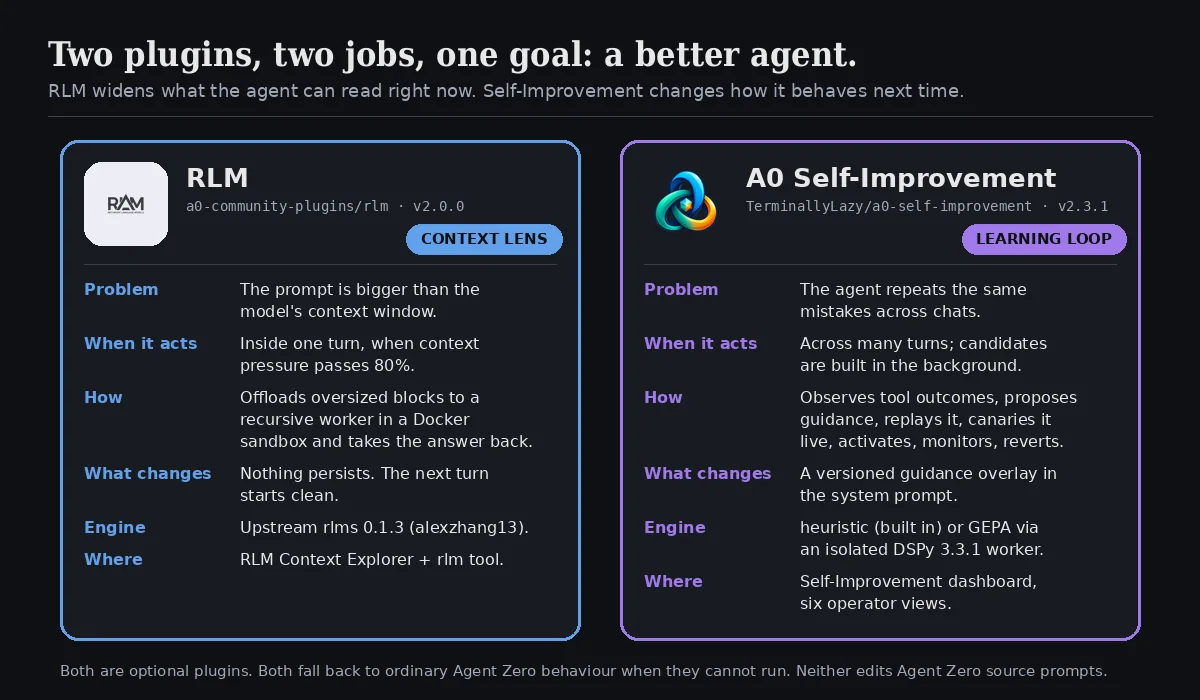
Here is how the hell you use each of them properly.
The shared ancestor: Recursive Language Models
Both plugins descend from the same research idea: a Recursive Language Model. Instead of stuffing a huge input into one prompt, the model receives a handle to the input, writes small programs to inspect it, calls itself on the pieces, and assembles an answer. Big text becomes something the model navigates rather than swallows.
The RLM plugin wraps the reference implementation, alexzhang13/rlm (the rlms package on PyPI), and points it at Agent Zero's prompt. A0 Self-Improvement uses DSPy's RLM module as one of its analysis routes, pointed at the agent's own tool-outcome evidence. Same trick, opposite direction: one reads the world, the other reads the agent.
If you want the full theory of why the combination of RLM analysis and GEPA prompt evolution matters, we wrote it up in A0 Self-Improvement: RLM, GEPA, and why the combination wins. This article is the how.
Plugin 1: RLM, the context lens
What it does in one sentence
When a prompt is about to overflow the chat model's context, RLM quietly offloads the oversized blocks to a recursive worker running in a sandbox, lets that worker read them, and hands Agent Zero the finished answer or the exact tool-call JSON it was about to produce anyway.
Install it
Clone or copy the repository to usr/plugins/rlm and enable it in the Plugin Hub. That is the whole install. The plugin's own install() hook puts rlms==0.1.3 into the framework Python environment (/opt/venv-a0 in the standard Docker image), not the agent's execution environment, so there is no second setup command. If the install is interrupted, the RLM Context Explorer offers Retry Setup, which runs the same hook again.
Restart Agent Zero after upgrading the dependency if it was already loaded.
Step 1: Sort out Docker (do not skip this)
Here is the part that trips people up. RLM's worker executes model-generated Python to inspect your data. The upstream library offers a LocalREPL that runs that code inside the Agent Zero process. The plugin refuses to use it silently, and it is right to: no process, filesystem or network isolation, running code written by a model, against documents you did not write. So auto and docker modes require Docker, and if Docker is not ready the plugin simply falls back to the normal model path.
If Agent Zero itself runs in Docker (it usually does), the container needs a Docker CLI and access to a Docker daemon. For the standard Compose service there is a host-side helper:
./usr/plugins/rlm/setup/enable-docker-access.sh --apply
It validates read-only first, asks before changing anything, builds a small Agent Zero-derived image with the official Docker CLI, and recreates only that service with the socket mounted. A running container cannot gain a new bind mount, so a recreation is unavoidable. Custom layouts need the equivalent by hand: a Docker CLI in the image, the endpoint at /var/run/docker.sock (or DOCKER_HOST), and /a0 backed by a host bind mount so nested workspaces can be shared.
Docker socket access is highly privileged. Use a hardened proxy if this is anything other than your own workstation.
Then open the Explorer (there is an RLM Context Explorer button in the sidebar quick actions) and press Run Sandbox Probe. It verifies the CLI, daemon, image, bind mount and callback path together before a real model run. Green there means the route is real.
local mode still exists as an explicit, informed opt-in for trusted, development-only workloads. Do not pick it for untrusted prompts or documents.
Step 2: Understand when it fires
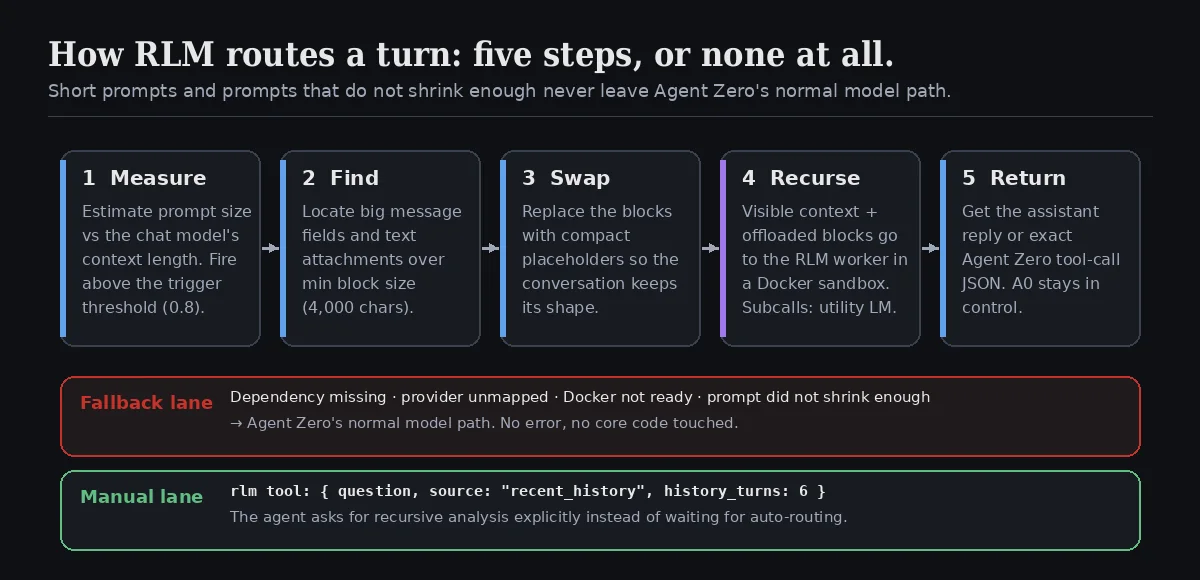
Automatic routing is a five-step decision, and every step can say "no":
| Step | What happens | Knob |
|---|---|---|
| Measure | Estimate the prompt against the active chat model's context length | Trigger threshold (default 0.8) |
| Find | Locate message fields and text attachments large enough to be worth offloading | Minimum block size (4000 chars), Attachment scan cap (2,000,000 chars) |
| Swap | Replace those blocks with compact placeholders so the visible prompt keeps its shape | automatic |
| Recurse | Hand visible context plus offloaded blocks to the upstream RLM worker | Environment mode, Docker image (python:3.11-slim), execution limits |
| Return | Receive the assistant reply or exact Agent Zero tool-call JSON | automatic |
Short conversations, prompts with no eligible blocks, and prompts that do not shrink enough after swapping never leave the normal path. So do prompts hit while a dependency, provider mapping or Docker readiness is blocked. RLM is a lens you can leave on: when it has nothing to do, it does nothing.
One security note worth knowing: attachment ingestion is restricted to Agent Zero's usr/uploads directory and rejects symlink escapes. RLM never reads arbitrary local paths as attachments.
Step 3: Ask for it explicitly
Auto-routing is for overflow. Sometimes you know in advance that a pile of recent tool output needs a careful reader. That is what the rlm tool is for (toggle Manual tool enabled). The agent calls it like any other tool:
{
  "tool_name": "rlm",
  "tool_args": {
    "question": "Summarize the important findings and recommend the next step.",
    "source": "recent_history",
    "history_turns": 6
  }
}
In plain chat you can simply say: "Use the rlm tool over the last six turns and tell me which tests are actually failing." Agent Zero stays in charge of the conversation; RLM does the reading.
Step 4: Tune the limits
The Execution section of the config is the upstream RLM budget: Maximum depth (2), Maximum iterations (20), Maximum timeout (120 s), Maximum errors (3), Maximum concurrent subcalls (4), plus Maximum budget and Maximum output tokens (both 0 = no cap). Subcall model source decides whether the recursive sub-questions use Agent Zero's Utility model (the default, and the cheap choice) or the root chat model.
Provider mapping is automatic for OpenAI-compatible endpoints (including OpenRouter), Anthropic, Azure OpenAI, Gemini and Portkey. The Explorer's Practical Readiness panel tells you which mapping is active and names any blocker.
Persistence is off by default because stored trajectories can contain excerpts of prompts, model output and tool output. Turn it on when you are learning how RLM thinks: the Explorer's Recent Runs view then shows an Iteration Map, Subcall Feed, Prompt Reduction and the Final Answer for each run. Set Retention count (25) to taste and turn it off again when you are done.
RLM supports per-project and per-agent configuration, so a research project with a lot of PDFs can run a higher trigger threshold and deeper recursion than your everyday chats.
Plugin 2: A0 Self-Improvement, the learning loop

What it does in one sentence
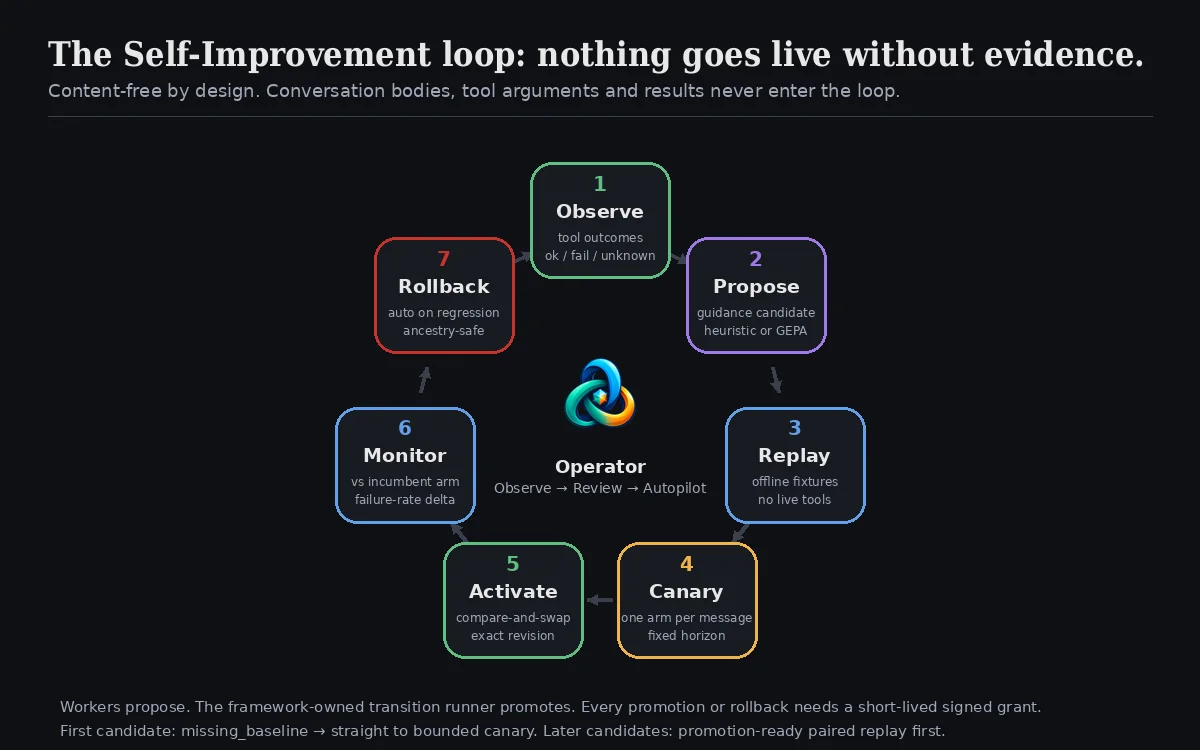
A0 Self-Improvement records whether the agent's tool calls succeeded, without recording what they said, proposes small allowlisted behavioural rules to fix recurring failures, tests those rules offline and then on a slice of live traffic, activates them into the system prompt as a versioned overlay, watches them, and rolls them back if they make things worse.
It calls itself dspy_rlm internally, ships as version 2.3.1, and is built around a principle you will see repeated everywhere in its UI: workers propose, the framework promotes. No model, not GEPA, not RLM, not a clever worker, can change what the agent does. Only the plugin's own transition runner can, and only with evidence and a signed grant.
Install it
Clone into usr/plugins/dspy_rlm (the folder name matters; it is the plugin's import name) or install from the Plugin Hub. Then:
- Put the chat in a project. Self-Improvement enrolls chats at the Agent Zero project boundary, so parallel and child agents in the same project share one learning scope. If you skipped Part 2, now you know why it mattered. Chats without a project are not prepared automatically.
- Enable the plugin. Before the next message in that project, the plugin creates a safe, byte-inert starting profile (internally: Genesis) for every chat it discovers there. It reads only chat IDs and project identifiers. Nothing about the prompt or responses changes. No command-line setup is required.
- Open the dashboard. Pick a chat from the project-coloured context menu and you get six read-only operator views: Overview, Improvement, Evidence & Fixtures, Policy & Capabilities, Receipts & Audit and Privacy & Migration. They are deliberately content-free: no raw prompts, tool traffic, fixture bodies, model reasoning, provider identifiers, filesystem paths, secrets or exception strings.
The heavy machinery is separate. The install() and pre_update() hooks build a hash-locked worker environment (DSPy 3.3.1, GEPA 0.1.4 and the full transitive closure from requirements-gepa.lock) with uv, smoke-test dspy.RLM and dspy.GEPA, and keep all of it out of Agent Zero's framework interpreter. In Docker that lives at /opt/dspy-rlm-worker-venv; natively at state/worker-venv. A non-blocking startup extension repairs it after the container is recreated. requirements.txt is intentionally empty so the normal plugin installer cannot pollute the framework.
Step 1: Pick how far it may go
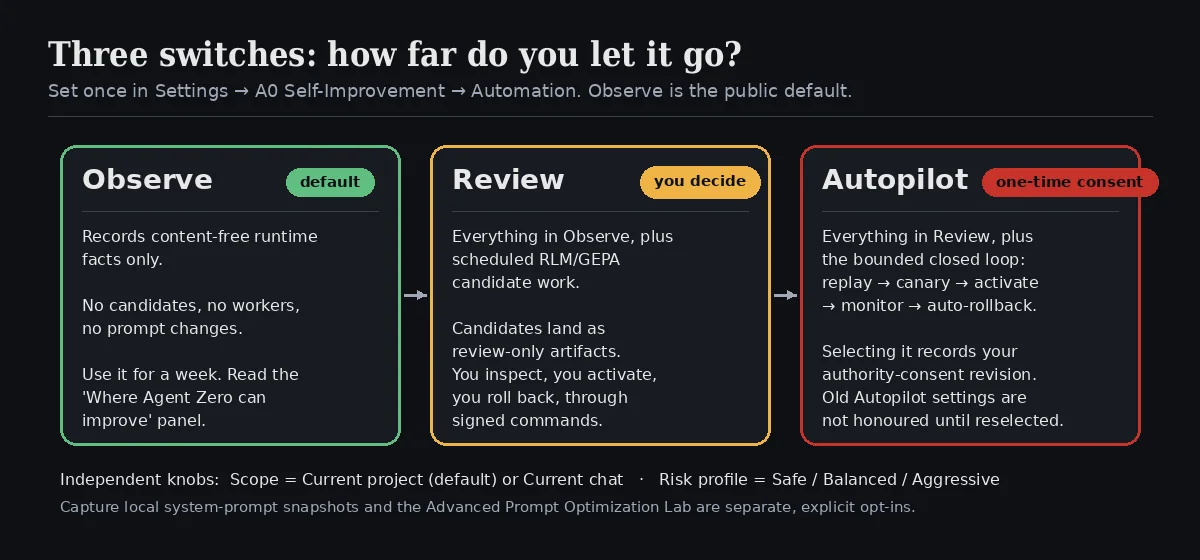
On the Settings page, Automation → Mode is the only switch that matters on day one:
| Mode | What it does | What it does not do |
|---|---|---|
| Observe (default) | Records content-free runtime facts: which tools ran, whether they reported success, failure or unknown | Builds no candidates, starts no workers, changes no prompt |
| Review | Everything in Observe, plus scheduled RLM/GEPA candidate work | Never activates anything; candidates are review-only until you act through a signed command |
| Autopilot | Everything in Review, plus the bounded closed loop: replay → canary → activate → monitor → auto-rollback | Never bypasses replay or canary gates; never overwrites a manual pointer change |
Selecting Autopilot is a one-time, explicit authorization: the UI records your authority-consent revision. An Autopilot value saved by an older release is treated as non-authoritative until you select it again. It is a small detail that tells you a lot about how the plugin thinks.
Two independent knobs sit beside the mode. Scope is Current project (default) or Current chat for narrower experiments. Risk profile is Safe / Balanced / Aggressive and governs evaluation thresholds, not automation.
Step 2: Read the Overview before you touch anything else
Run in Observe for a few days of real work, then open Overview. Two panels are worth the visit.
Where Agent Zero can improve ranks learning areas (the plugin calls them buckets: shell, tool_retrieval, reasoning, decision_making) by explicit failures, and shows successes, failures and unknown coverage separately. Unknown is honest: a tool that did not report an outcome is neither a win nor a loss. If most of your evidence is unknown, the fix is in your tools, not in the optimizer (more on that below).
Learning health summarizes the selected chat's latest 20 jobs as candidate proposals, skipped work, and failed or rejected attempts, with a next-step message for the common blockers. The README is blunt about what this is: a history of attempts, not a quality score.
Step 3: Let it propose (Review)
Switch to Review. Now Learning Controls come alive: Auto optimize enqueues candidate work every Interval messages (12) or Interval minutes (180), respecting Cooldown (hours) (6) and Min samples (10). The dashboard shows the nearest threshold as completed loops / required loops / remaining, so you always know why nothing has happened yet.
Two engines can produce candidates:
- heuristic is the dependency-free local engine. It is always available and it is not GEPA, and the UI will never label it as such.
- GEPA (toggle Enable GEPA) runs in the isolated worker and evolves guidance reflectively using DSPy. Its metric budget is capped by GEPA metric evaluation budget (
24calls, range 1–1000). Compile duration and reported cost limits (max cost5.0USD) are acceptance checks after the fact, and the dashboard says plainly that complete token and dollar accounting is unavailable. Budget accordingly.
Candidates land on the Improvement tab as staged guidance, labelled candidate. A candidate is a set of allowlisted rules bound to an exact incumbent profile; it is not free-form prompt text. When a promotion gate declines, you see review_only and a reason code. This is where most new users assume something is broken. It is not. It is the plugin declining to guess.
The model routes (RLM analysis, GEPA reflection, the semantic evaluator) use rlm.model_ref / evaluator.preferred_dspy_model if you set them, then DSPY_RLM_MODEL, then DSPY_MODEL, and otherwise derive the selector from Agent Zero's effective utility-model preset. Set a cheap, fast utility model and the whole loop gets cheaper.
Step 4: Let it ship (Autopilot), and understand the gates
Autopilot turns on the closed loop, and the closed loop is where the engineering lives:
- Replay. The candidate is compared to the incumbent on offline fixtures: recorded prompt-output or tool fixtures, never live tool execution. The very first candidate has no incumbent guidance to pair against, so it may advance from the explicit
missing_baselinestate straight into a bounded canary. Every later candidate needs a promotion-ready paired replay first. - Canary. Each complete user message is deterministically assigned to one arm, incumbent or candidate (Candidate canary traffic (%), default
10). The experiment runs to a fixed, calibrated horizon chosen so the chance that either arm misses its Minimum observations per arm is one percent. Every message gets at most one outcome receipt. Unknown outcomes do not advance the experiment. Expired canaries terminate. - Activate. If the candidate's failure-rate delta clears the bar, the framework-owned runner promotes it with an active-revision compare-and-swap and a short-lived signed grant. The overlay is now part of the system prompt for that scope.
- Monitor. The promoted artifact keeps being compared against the measured incumbent arm.
- Rollback. If failure rate rises past Live failure-rate increase (
0.05) or the score regresses past the configured limit, Automatic rollback reverts, ancestry-safe, without overwriting anything you changed by hand. Manual rollback is a separately signed command and remains the only other profile-mutating transition.
Every step is visible in Recent activity as content-free events, and every transition leaves a receipt on Receipts & Audit.
One current limitation worth knowing: the certified system-prompt hook exposes a trusted live bucket only for reasoning right now. Candidates for other buckets stay visible for review rather than entering a canary whose traffic could not be attributed correctly. That is the plugin refusing to run an experiment it cannot measure.
Step 5: Make your tools tell the truth
The single highest-leverage thing you can do for A0 Self-Improvement has nothing to do with its settings. It reads outcomes from Response.additional["success"]. An exact boolean is recorded as success or failure. Anything else (missing, a string, a number) is recorded as unknown. The plugin never inspects tool output prose to guess whether a call worked.
So if you write custom tools, plugins or MCP wrappers, set that boolean. A tool that can attest its own outcome turns the unknown column into signal, and signal is what the candidate search runs on.
Same DNA, different organs
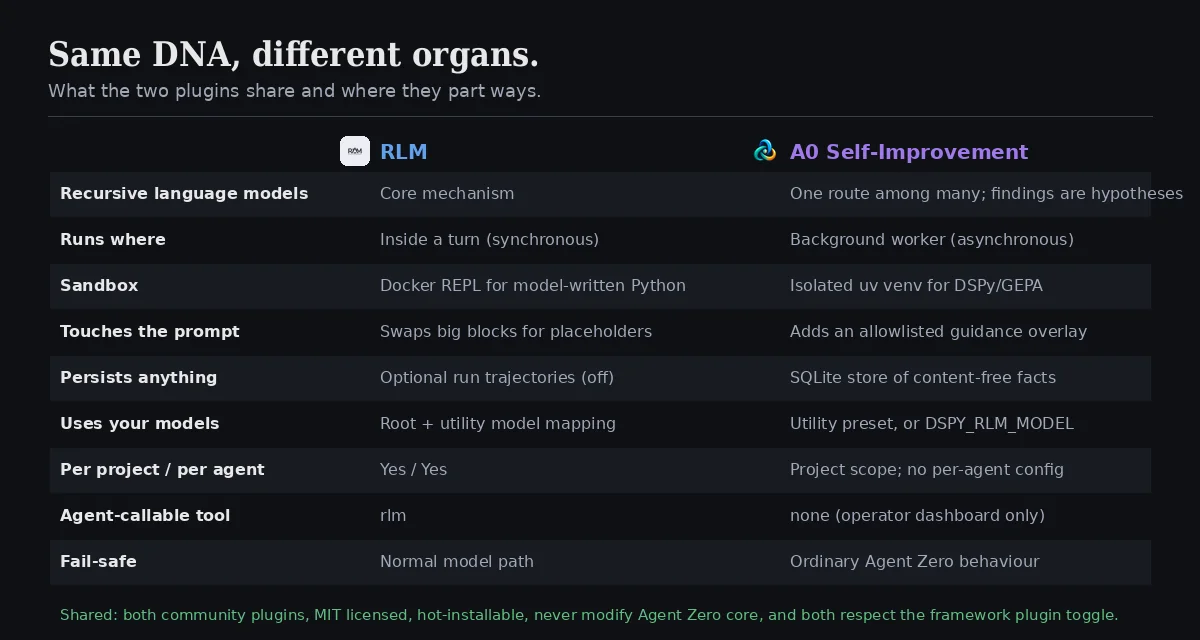
| RLM | A0 Self-Improvement | |
|---|---|---|
| Solves | Prompt bigger than the window | Recurring behavioural mistakes |
| Time horizon | This turn | The next hundred turns |
| Runs | Synchronously, inside the model call | Asynchronously, in background workers |
| Uses recursive LMs for | Reading external material | Analysing the agent's own outcome evidence |
| Sandbox | Docker REPL for model-written Python | Isolated uv venv for DSPy/GEPA |
| Touches the prompt | Swaps oversized blocks for placeholders | Adds a versioned, allowlisted guidance overlay |
| Persists | Optional run trajectories (off) | Content-free facts, candidates, receipts in SQLite |
| Agent-callable | rlm tool |
No tool; operator dashboard only |
| Scoping | Per project and per agent | Project scope (or current chat); no per-agent config |
| Upstream | alexzhang13/rlm (rlms 0.1.3) |
DSPy 3.3.1 + GEPA 0.1.4 |
| When it cannot run | Normal model path, silently | Ordinary Agent Zero behaviour, silently |
What they share is the part that makes them safe to try: both are optional community plugins, both are MIT licensed, neither modifies Agent Zero core code or its source prompt files, both respect the framework's plugin toggle, and both fail toward ordinary Agent Zero rather than toward an error.
Getting the most out of them
Install RLM first, Self-Improvement second. RLM is a one-afternoon win with an obvious test (feed it something huge). Self-Improvement needs weeks of real traffic before it has anything to say. Doing it in that order keeps your expectations calibrated.
Run the sandbox probe before you trust an RLM run. A mounted socket is not a working sandbox. The Explorer separates Docker CLI, endpoint, daemon and sandbox probe status for exactly this reason.
Give RLM a cheap utility model. Recursive subcalls multiply. subcall_model_source: utility is the default; keep it, and make the utility model a fast one.
Turn on RLM persistence for a week, then off. Reading the Iteration Map and Prompt Reduction for a few real runs teaches you what a good trigger threshold looks like for your workload. Then stop storing excerpts of your own data.
Observe before Review, Review before Autopilot. The modes are a ladder for a reason. Observe shows you where the failures are. Review shows you what the engines propose. Only then does letting Autopilot ship make sense. Most people should stay in Review for a long time and enjoy it.
Fix unknown before tuning anything. If the Overview says most tool outcomes are unknown, no optimizer on Earth can learn from that. Make tools report success.
Keep one project per job. Self-Improvement learns at the project boundary. A project called "Work" will learn a blur. This was the lesson of Part 2 and it applies twice as hard here.
Read reason codes, not colours. review_only with a reason is the plugin being transparent about why it stopped. Treat it as documentation, not as a bug report.
Do not expect billing accuracy from GEPA. The metric-call cap is a budget on evaluations, not on tokens or dollars. If cost matters, cap it at the provider too.
Common problems
| Symptom | Check |
|---|---|
| RLM never fires | Trigger threshold too high for your model's window, or no block over Minimum block size. Try the rlm tool explicitly first. |
| Explorer shows Docker blockers | Run setup/enable-docker-access.sh --apply (Compose) or add CLI + socket + /a0 bind mount by hand, then Run Sandbox Probe. |
| RLM provider "unmapped" | Only OpenAI-compatible, Anthropic, Azure OpenAI, Gemini and Portkey map today. Check Practical Readiness. |
| Self-Improvement dashboard shows no chats | The chat is not in a project, or the plugin was enabled after the last message. Send one message in a project chat. |
activation_scope_missing in readiness |
Automatic setup is off, the chat has no project, or enrollment failed. A new message loop in that project normally repairs it. |
Every candidate is review_only |
Read the reason code. Usually: not enough samples, missing_baseline for a non-reasoning bucket, or you are in Review mode where that is the correct outcome. |
| GEPA never runs | Enable GEPA is off, or the worker venv failed to build. Re-run the plugin setup action; in Docker, after every container rebuild. |
Old /optimize, /promote, /rollback calls fail |
They are retired and return 410 on purpose. Use the signed command surface through the dashboard. |
Why this is worth the effort
| Without them | With them |
|---|---|
| Giant tool output silently truncated, model guesses the rest | Oversized blocks read recursively in a sandbox; the agent answers from the whole thing |
| "Please don't do that again" typed into every chat | Recurring failures ranked per bucket, with proposals to fix them |
| Prompt tweaks shipped on vibes | Candidates replayed offline, canaried live, promoted only on measured delta |
| One bad rule breaks every chat until you notice | Automatic, ancestry-safe rollback with a receipt |
| Your conversations feeding an optimizer | Content-free facts only; prompt capture is a separate explicit opt-in |
Neither plugin makes the model smarter. RLM makes the agent able to look. Self-Improvement makes it able to learn, slowly and with the receipts to prove it. Together they are the closest thing Agent Zero has to an agent that gets better at your job while you get on with it.
Quick reference
RLM (usr/plugins/rlm, v2.0.0)
  Install:   clone → enable in Plugin Hub → hook installs rlms==0.1.3 into /opt/venv-a0
  Docker:    ./usr/plugins/rlm/setup/enable-docker-access.sh --apply  → Explorer → Run Sandbox Probe
  Settings:  Automatic routing · Trigger threshold 0.8 · Minimum block size 4000
             Environment mode auto|docker|local · Docker image python:3.11-slim
             Max depth 2 · iterations 20 · timeout 120s · errors 3 · concurrent subcalls 4
             Subcall model source utility · Persistence off · Retention 25
  Tool:      rlm { question, source: "recent_history", history_turns: 6 }
  Scope:     per project and per agent

A0 Self-Improvement (usr/plugins/dspy_rlm, v2.3.1)
  Install:   clone or Plugin Hub → put chat in a project → enable → open dashboard
  Modes:     Observe (default) → Review → Autopilot (one-time consent)
  Knobs:     Scope project|chat · Risk Safe|Balanced|Aggressive · require replay · require canary · auto rollback
  Learning:  Auto optimize · Interval 12 msgs / 180 min · Cooldown 6h · Min samples 10
  Engines:   heuristic (built in) · GEPA (Enable GEPA; metric budget 24; isolated DSPy 3.3.1 worker)
  Views:     Overview · Improvement · Evidence & Fixtures · Policy & Capabilities · Receipts & Audit · Privacy & Migration
  Tools:     emit Response.additional["success"] = true|false so outcomes are not "unknown"
  State:     usr/plugins/dspy_rlm/state/  (SQLite store, authority, migration; plugin-local, git-ignored)
  Recovery:  python scripts/a0_local_authority.py readiness-inspect --store ... --manifest ... --context <id>
That is Part 3. Next time in How the hell do I... with Agent Zero, another thing you have been meaning to figure out. If there is a corner of the WebUI, the Launcher or the A0 CLI you want covered, tell us on X at @agent0ai.