Your agent has a big job. You have a deadline. Somewhere on the internet, someone has suggested the obvious solution: more agents.
Excellent. Now you have four agents, four interpretations of the assignment, and a fifth agent explaining why everything is definitely going great.
A useful swarm needs more than headcount. It needs bounded assignments, visibility, somewhere sensible to work, and someone responsible for checking the result. That is where A0 Swarm comes in—and where understanding what Agent Zero already does will save you a lot of unnecessary orchestration.
Welcome to Episode 4 of How the hell do I... with Agent Zero. Part 1 organized the plugin drawer. Part 2 established projects. Part 3 separated self-improvement from context management. This time: put several workers on the job without turning your workspace into a group project nobody wants to own.
Naming note: we are using “A0 Swarms” for this episode. The actual installed plugin is A0 Swarm, singular, with directory identity a0_swarm.
Research basis: this guide examines A0 Swarm's declared 2.0.0 version at commit f7b278d, compared with native Agent Zero v2.12, commit b1cbd1f, on September 22, 2026. Installation labels, defaults and behavior were checked against documentation and source. We ran the plugin's 18 tests and bounded implementation probes, not a live multi-agent deployment. Examples below are recipes, not fabricated successful runs. The plugin does not declare a numbered minimum Agent Zero release; matching the version numbers is not a compatibility guarantee.
The short answer: what does A0 Swarm actually add?
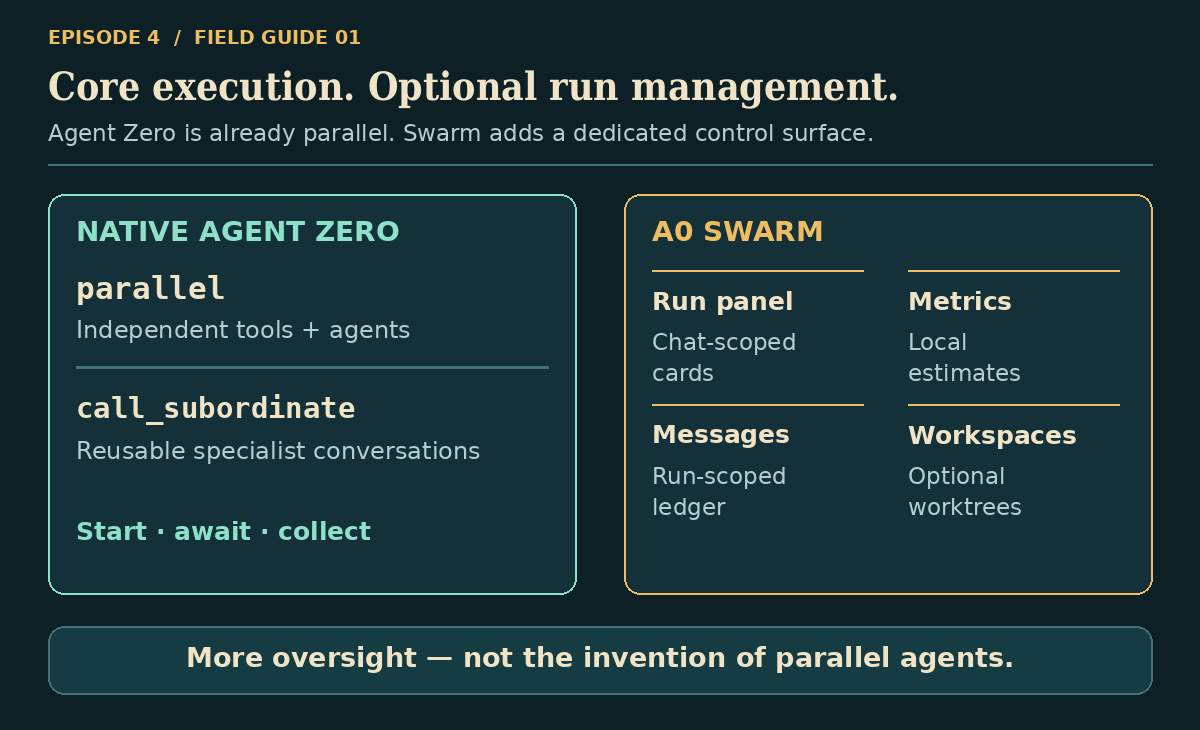
Agent Zero already knows how to delegate and run work in parallel. Swarm does not unlock a previously missing second brain.
Native call_subordinate creates or continues a specialist agent. Native parallel runs independent tool calls—including multiple specialist delegations—concurrently. Swarm adds an alternative, agent-focused delegation tool, delegate_parallel, together with a dedicated Swarm monitoring panel, local worker activity previews, estimated metrics, messaging, remote routing and optional workspace management.
Think of the distinction as execution tools versus a purpose-built control panel and its worker workflow. Swarm uses Agent Zero's agent machinery, but it is not simply a different skin over a native parallel job: its worker lifecycle and return behavior differ.
Choose your starting point
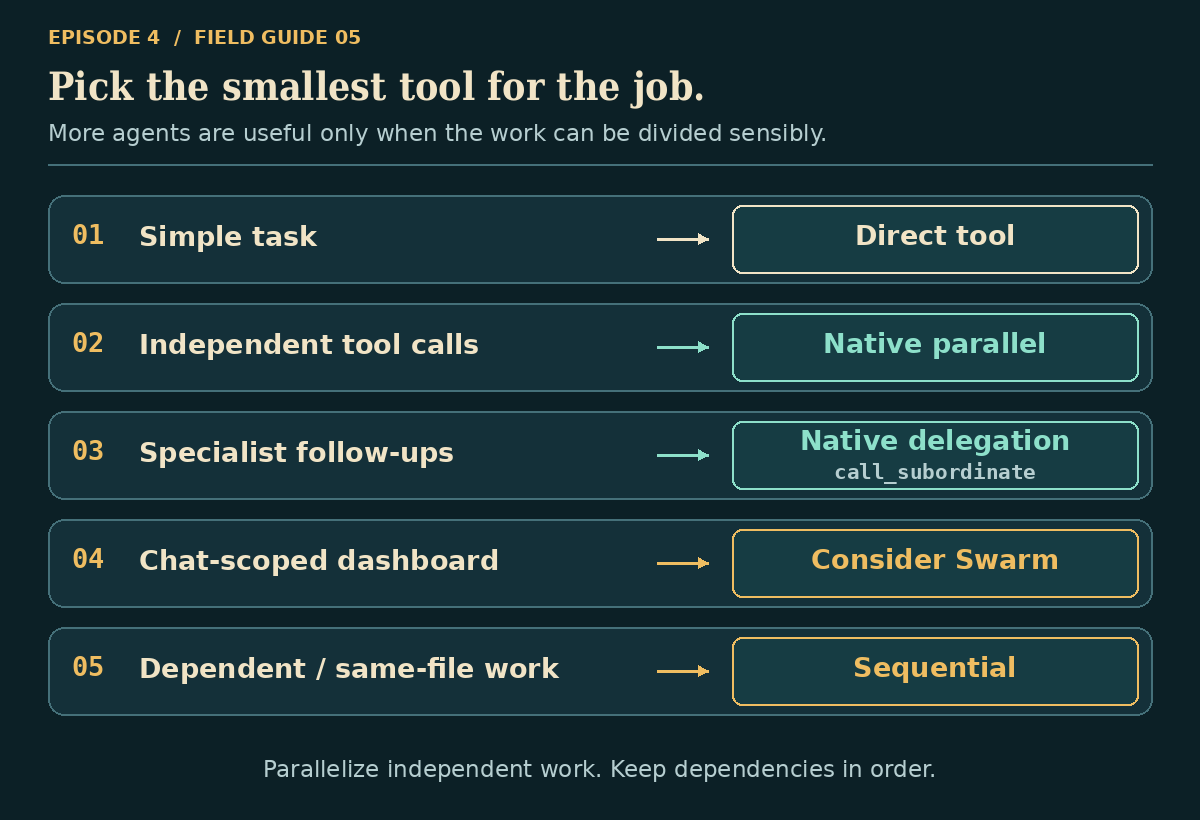
| You want to… | Start with… |
|---|---|
| Run two independent searches or checks | Native parallel |
| Ask two specialists for independent reviews | Native parallel plus call_subordinate; Swarm is optional |
| Keep working while jobs run, then collect them | Native parallel with wait: false |
| Return to the same specialist's conversation later | Native call_subordinate using its returned context_id |
| Watch a batch of workers through dedicated chat-scoped cards | A0 Swarm |
| Route assignments through a configured list of remote agents | Consider Swarm, after testing the actual remote target |
| Provision separate Git worktrees for independent edits | Consider Swarm's isolated mode, with the safeguards below |
| Run tomorrow or every Monday | Agent Zero's scheduler—not either fan-out mechanism |
The best reason to install Swarm is that you want its operational view and workflow, not that somebody said “multi-agent” three times.
What a swarm is—and what it is not
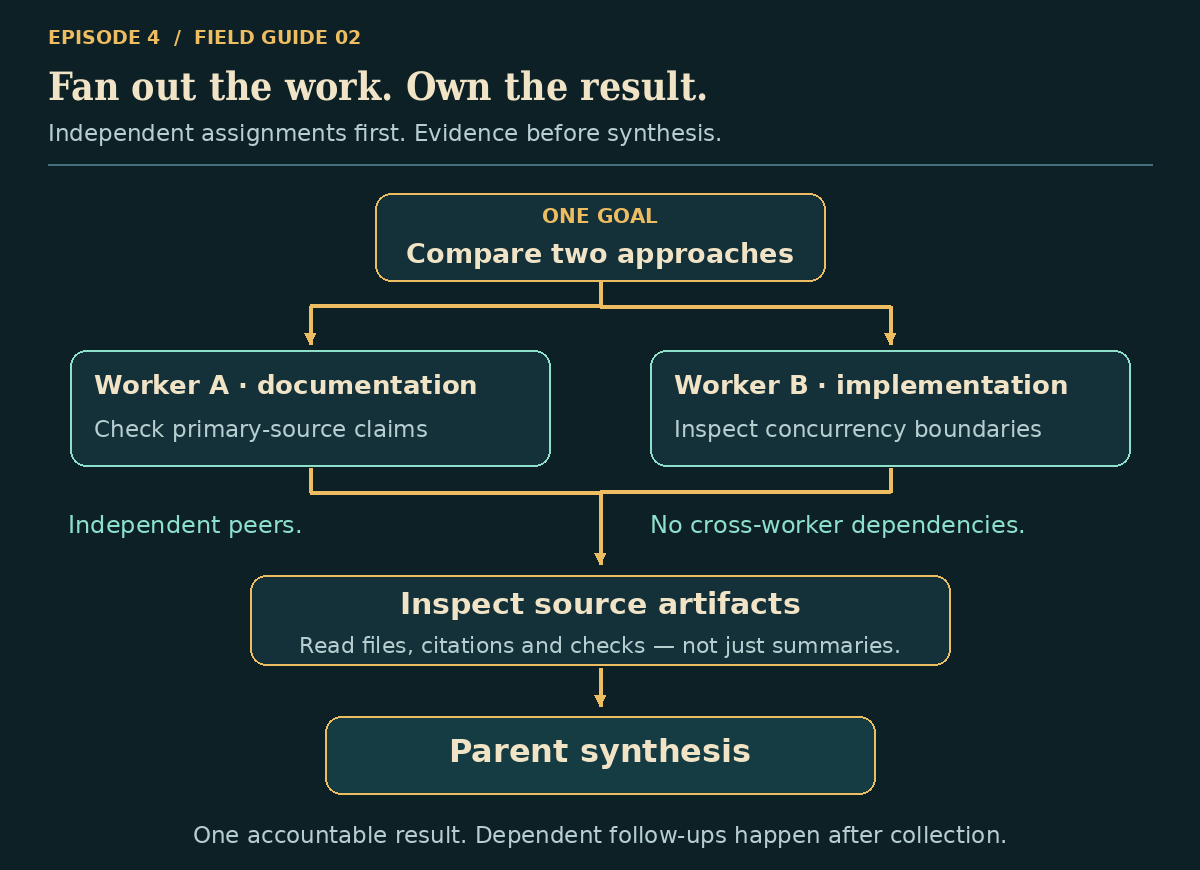
The implemented pattern is straightforward:
- The parent receives the real task and divides it into independent assignments.
- One
delegate_parallelcall prepares local or remote workers. - Workers execute concurrently and update the plugin's records.
- The tool waits for all worker tasks to finish and returns a combined result summary.
- The parent compares evidence, resolves disagreements and produces the final answer.
That is fan-out, then fan-in. The delegation implementation does not implement a visual workflow graph, autonomous task marketplace, consensus vote, or selectable hierarchy/mesh topology. Labels such as “Researcher,” “Critic” and “Editor” are assignments you provide, not magic built-in roles.
Local workers start fresh. Do not assume they inherit the parent's entire conversation. A profile supplies behavior; an activated project supplies project context; the assignment still has to say what success looks like.
Good parallel work: two independent source reviews, different sections of a research brief, separate acceptance-test proposals.
Bad parallel work: “design the API” and “implement the client for that API” at the same time, before the API exists. Also bad: three workers editing the same file because you called them a team.
If one task needs another's answer, collect that answer before launching the next stage. Messaging does not replace dependency planning.
Install it without inventing a second setup ritual
You need a working Agent Zero installation, a functioning model configuration, and the ability to install community plugins. Local delegation does not require another Agent Zero container, an exposed Docker socket, an A2A server, or the separate worktree plugin.
Plugins are code running inside your environment. Review the repository before installing; appearing in an index is not a security certification.
The Git installation route
Using the official installer controls:
- Open Plugins from the dashboard or sidebar.
- Choose Install, then Git.
- Enter
https://github.com/a0-community-plugins/a0_swarmin Git Repository URL. - Choose Clone & Install. This public repository does not require the installer's optional private-repository access token.
- On the installed A0 Swarm card, open Config, review the settings, and Save.
- Confirm the plugin is enabled. Follow a restart prompt if one appears; restart/refresh after plugin code changes if the frontend extension has not appeared.
A0 Swarm was present in the Plugin Index snapshot inspected for this guide. You can also look for it through Plugins → Browse and review/install it there. If installing manually, preserve the directory name usr/plugins/a0_swarm; its imports and browser paths rely on that identity.
The plugin README explicitly says there is no separate Execute step. Its monitor is a canvas surface, not a standalone plugin Open page. There is no “Start swarm” button: the agent starts work through delegate_parallel.
Installing from the repository's current branch may retrieve a newer revision than this guide. Check what you installed before treating a version-specific caveat as fixed—or still applicable.
The settings that matter
These are the actual configuration controls and shipped defaults.
| Setting | Default | What it means in practice |
|---|---|---|
| Max parallel agents | 4 |
Maximum task count in one delegation call. Effective ceiling: 16. An oversized request is rejected, not queued into waves. Start with two actual tasks. |
| Default subagent profile | Blank | For local workers: task-specific profile first, then this setting, then the parent's profile. Use a profile that actually exists on your instance. |
| Result size cap (KB) | 64 |
About 64 KiB per retained worker result and summary entry. Larger results are truncated. This is not a model-token or spending limit. |
| Subagent workspace | none |
Where local workers work. The default does not activate your current project in each worker. |
| Remote Agent Zero instances | Empty | Optional named A2A destinations. Leave empty for your first run. |
These settings are global plugin configuration: the manifest does not support per-project or per-agent configuration scopes. Workspace mode is not a delegate_parallel argument.
Two additional keys appear in the shipped defaults under remote_diagnostics: docker_discovery_enabled and test_timeout_s. In this inspected revision they are not wired into the implementation. Do not rely on them as an enforced disable switch or diagnostic timeout.
Your first useful swarm: two reviewers, no file edits
Start with something you can judge, not “build my entire company.” Here is a concrete first exercise: a read-only release-readiness review of a project you already understand.
1. Prepare the workspace
Activate the intended project in the parent chat. In Swarm's Config, select inherit (shared parent project) and save. Confirm the project contains its README and the source you want reviewed.
Keep the maximum at four, but request two workers. Leave remotes empty. Do not run this inside an active or blocked Agent Harness workflow; Swarm explicitly guards against those contexts and against nested Swarm workers.
If you have no project, use none and give workers self-contained public research questions instead. Do not ask default global-workdir workers to magically find an unspecified repository.
2. Give Agent Zero this brief
Use A0 Swarm's delegate_parallel for two independent, read-only reviews of the active project. Give each worker the intended project's exact name and absolute root path. Require it to verify both before reviewing, and to stop and report any mismatch without modifying anything. Label one worker Documentation and the other Implementation. Documentation should examine the README for unsupported claims, missing prerequisites and ambiguous setup steps. Implementation should inspect the source for lifecycle, error-handling and persistence boundaries. Give each worker the full assignment and require file paths, relevant line references, uncertainties, and its five most important findings. Do not install dependencies, execute project code, run models or servers, edit files, commit, push, or start another orchestration layer. Wait for both results. Then reconcile them into one release-readiness report, distinguish verified facts from inference, and tell me what still needs live testing.
This is a proposed recipe, not a claim that the two reviews have already run. Adapt the scope and permissions to your project.
The important ingredients are not the role names. They are independence, boundaries, evidence and a common output contract.
3. Understand the tool call
You normally ask in plain English. For readers who want the underlying shape, here is a source-checked template. Replace the project-name and absolute-path placeholders with the parent project's actual values before using it:
{
  "tool_name": "delegate_parallel",
  "tool_args": {
    "tasks": [
      {
        "label": "Documentation",
        "task": "Read-only README review. Expected project: REPLACE_WITH_PROJECT_NAME; expected root: REPLACE_WITH_ABSOLUTE_PROJECT_PATH. Verify both before reviewing. If either differs, stop and report the mismatch without edits. Identify unsupported claims, missing prerequisites and ambiguous setup steps. Return the five most important findings with file paths, line references and uncertainties. Do not execute project code, install, edit, commit, push or launch another orchestrator."
      },
      {
        "label": "Implementation",
        "task": "Independent read-only source review. Expected project: REPLACE_WITH_PROJECT_NAME; expected root: REPLACE_WITH_ABSOLUTE_PROJECT_PATH. Verify both before reviewing. If either differs, stop and report the mismatch without edits. Inspect lifecycle, error handling and persistence boundaries. Return the five most important findings with file paths, line references and uncertainties. Do not execute project code, run models or servers, install, edit, commit, push or launch another orchestrator."
      }
    ]
  }
}
Each task requires nonempty task text. Include a useful label; the runtime can generate one if omitted. Optional profile selects a local profile; optional endpoint selects a remote destination. Omit the latter for local workers. The task validator limits assignment text to 100,000 characters and caps the batch count before launching it.
Do not add invented wait, resume, mode or job_ids arguments to this call. Swarm's delegation tool awaits its workers; it does not expose native parallel's background-job lifecycle.
4. Inspect, then synthesize
Open the Swarm surface, watch the worker activity, and inspect their terminal results. After the combined tool response reaches the parent, ask it to verify the cited files and reconcile disagreements rather than concatenate two reports.
Your first-run success condition is modest and observable: two assignments, two intelligible outcomes, no unauthorized changes, and one evidence-backed parent report. A failed worker is not a successful review just because its card moved into Completed.
Read the panel like an operator, not an audience
With a chat selected in the desktop WebUI, open Swarm from the right-hand canvas rail or its canvas tab. If the rail/surface is hidden by your preferences, enable it. The welcome screen without a selected chat is not the place to look for that chat's workers.
The current panel shows Active and Completed worker cards for the selected chat. Backend records carry run identifiers, but the visible panel is not a per-run tabbed workflow graph.
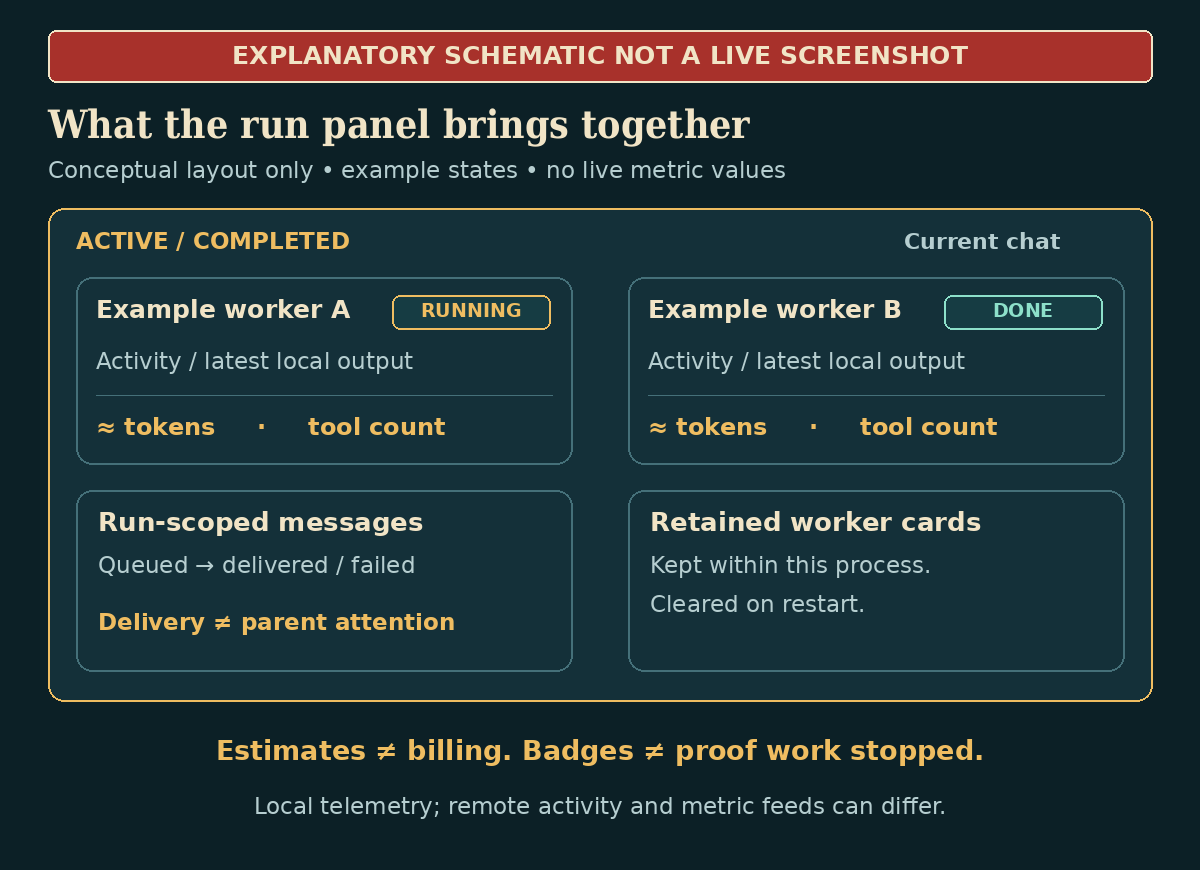
This is an editorial schematic, not a captured live run. No activity, performance or successful task execution is being claimed by the illustration.
| What you see | What you can conclude |
|---|---|
| Elapsed, Tools, Tokens in, Tokens out | Operational indicators. Tokens are estimates, not a provider invoice; remote telemetry is not equivalent to local telemetry. |
| Activity text and animated progress bar | The worker's reported activity. The bar is indeterminate—not percent complete. |
| Reasoning stream / Response stream | Available local tail previews, not a guaranteed complete transcript. Reasoning text depends on model/provider behavior. |
| Blocked: | A reported blocker. It does not prove the worker is suspended pending an answer. |
| Completed | Terminal cards: done, failed or cancelled. Expand and read the result. |
| live / polling fallback | Panel transport state, not task success. Polling fallback can still deliver updates. |
| Clear | Removes terminal cards for this chat. It is not a result archive, branch merge or task restart. |
Click a card header to expand it. An active card offers Message and worker Cancel controls. Its composer has Send, and Send & Unblock when the worker is blocked. A Cancel inside the composer merely closes the composer; it is not the worker-cancellation action.
A failed completed card may omit the underlying failure explanation in this revision. Inspect the parent tool summary and logs rather than assuming the absence of an error paragraph means nothing went wrong. These details come from the actual panel markup, not a promotional mockup.
Messaging: useful, but not telepathy
A locally registered Swarm worker can use swarm_message to address orchestrator or an exact same-run worker name. The ledger records queued, delivered and failed states. Retry retries a message, not the worker's entire assignment.
For human clarification, use the worker card's Message composer. The plugin also recognizes leading main-chat mentions:
| Prefix | Intended routing |
|---|---|
@<exact-worker-name> |
That active worker; copy its real generated name rather than guessing one |
@1, @2 |
Matching active worker slots in this chat; potentially ambiguous across simultaneous runs |
@all |
All active workers in the chat, not just one run |
@orchestrator |
Continue the cleaned message to the parent |
Human-readable task labels are not routing addresses. Use exact worker names, especially with many workers: the current avatar numbering wraps after eight, whereas numeric mentions use actual slots. A routed worker-only message may bypass normal parent submission.
Here is the important implementation boundary: a worker message “delivered” to the orchestrator is recorded in the ledger; that delivery path does not inject the message into the waiting parent model's conversation. Likewise, is_blocker changes reported state, not an enforced pause-and-resume protocol. See the delivery implementation.
There is also a local-intervention risk on this source pairing: Swarm's gathered worker monologue is not attached to the context task handle that core communication uses. Sending a message can therefore start another task rather than intervene in the existing execution. This is a source-derived risk, not a separately live-tested result; do not assume Message safely interrupts the running worker.
Keep critical requirements in the original assignments, try interventions only on disposable work first, and inspect the actual outcome. Do not design a workflow whose correctness depends on an automatic mid-run parent decision the implementation does not guarantee.
Workspaces: three modes, very different consequences
Separate conversations are not separate filesystems. This is the setting most likely to turn an impressive demo into an expensive afternoon.
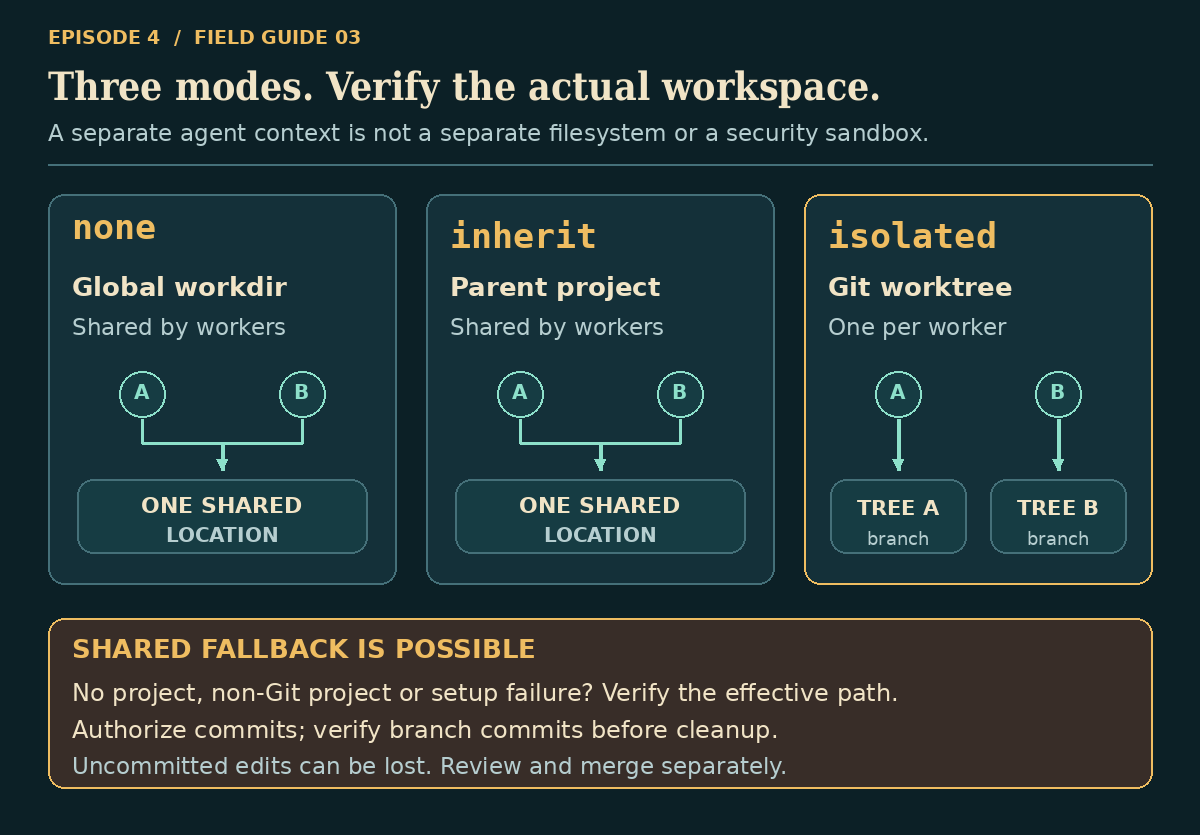
none: separate contexts, one global working area
This is the default. Workers do not automatically activate the parent's project. It fits self-contained research or non-project tasks, but does not provide filesystem isolation. Multiple workers can still touch the same global directory.
inherit: shared project, ideal for parallel reading
The parent's active project is activated for each local worker. This makes independent code reading, documentation audits and analysis straightforward.
It also means shared files. Use read-only assignments or strictly coordinated writes. Different labels do not prevent one worker from overwriting another's work.
isolated: separate Git worktrees—verify the reality
Swarm attempts to create a temporary worktree and a swarm/... branch for each local worker. It can integrate with the separate a0_worktree plugin when that plugin exposes the expected ownership contract; otherwise it has an inline implementation. Installing that other plugin is not mandatory.
This can help partition authorized edits, but the workspace source makes three caveats essential:
- Isolation can fall back to shared space. No project can mean global workdir; a non-Git project or a worktree failure can mean shared project inheritance. Selecting
isolateddoes not prove it succeeded. The card does not show the effective workspace. - Uncommitted work can be discarded. The inline cleanup forcibly removes the temporary worktree. The plugin does not automatically commit worker changes, even though its successful isolated-result preamble says they were “committed to branch.” That sentence is not verification.
- No automatic reviewed merge follows. Preserved commits still need inspection, testing and a deliberate merge/adoption decision.
For important edits, use a disposable trial repository first. Explicitly authorize any worktree/branch/commit operations your policy allows. Require each worker to verify its current directory and branch, stop before editing if isolation is wrong, and report a real commit hash after authorized changes. Confirm that commit exists on the reported branch before trusting the result. If you cannot provide that authorization and verification, keep the swarm read-only.
Inline worktrees start from repository HEAD, not a magical copy of the parent's uncommitted changes. Do not send workers an absolute cd back into the shared checkout; that defeats the point.
A Git worktree is collaboration infrastructure, not a security sandbox. It does not isolate credentials, network access or the rest of the container.
Native parallel versus Swarm: the real comparison
Both can overlap independent work and return multiple outputs. Both still need good task boundaries and parent verification. Neither creates correctness from agreement, nor a durable distributed job queue from a chat.
The differences are concrete:
| Capability | Native Agent Zero | A0 Swarm 2.0.0 |
|---|---|---|
| Work unit | Ordinary tools and/or subordinate-agent calls | Local or remote agent assignments |
| General concurrent tools | parallel batches supported tools |
Not a generic replacement for arbitrary tool_calls |
| Specialist conversations | call_subordinate; available profiles and explicit continuation |
Fresh local workers; task/default/parent profile selection |
| Parent-controlled background work | wait: false, then await / collect / cancel |
Delegation call waits for all workers; no corresponding job-handle API |
| Later local conversation | Returned child context_id with reset: false |
Local worker contexts are cleaned up after completion |
| Visibility | Native child chats and tool/job logs | Additional chat-scoped Active/Completed panel, local previews and estimates |
| Workspace provisioning | Parallel contexts do not automatically create worktrees | none, inherit, or attempted isolated worktrees |
| Remote agents | Core a2a_chat already exists |
Configured remote labels and per-task endpoint, with diagnostics/panel integration |
| Submission limit in inspected source | Up to eight tool calls per batch | Default four assignments; configurable to sixteen per call |
| Restart behavior | Running parallel-job registry is not restart-resumable; saved child conversation is a separate matter | Run/card/message registry is process memory; local workers are disposable |
Neither submission limit is an instance-wide spending budget. See the native parallel implementation and subordinate lifecycle.
The native equivalent is already multi-agent
For a simple specialist fan-out, the following shape is native. Use these profile names only if they are enabled on your instance:
{
  "tool_name": "parallel",
  "tool_args": {
    "wait": false,
    "tool_calls": [
      {
        "tool_name": "call_subordinate",
        "tool_args": {
          "profile": "researcher",
          "reset": true,
          "message": "Independently review the active project's README claims. Read-only: no execution, installs or edits. Return five findings with source references and uncertainty."
        }
      },
      {
        "tool_name": "call_subordinate",
        "tool_args": {
          "profile": "developer",
          "reset": true,
          "message": "Independently inspect the active project's lifecycle and persistence boundaries. Read-only: no execution, installs or edits. Return five findings with source references and uncertainty."
        }
      }
    ]
  }
}
The native response supplies real job IDs. The parent can perform other independent work, then await or collect those IDs. A wait timeout does not kill workers. Collect removes terminal jobs after returning their results, so do not reuse already-collected job IDs.
A completed specialist's child context_id is different from its job ID. Continue that exact child with call_subordinate, reset: false, and the returned context ID; do not invent one. That reusable conversation is a good reason to prefer native delegation for iterative work.
Use one appropriate orchestration layer for a batch. Do not wrap a Swarm launch inside native parallel just to manufacture a background lifecycle or bypass guards.
Remote swarms: optional, advanced, and worth a smoke test
Swarm can route an assignment to another Agent Zero instance through A2A. This is useful when that instance has a particular project, model or environment. It does not require every task to be remote, and configuring a remote does not copy your local files to it.
Configure the target first
On the remote Agent Zero instance, follow its official A2A setup:
- Open Settings → MCP/A2A → A0 A2A Server.
- Enable the A2A server and Save.
- Open connection example and copy the actual A2A Connection URL, selecting the remote project if needed.
- Make sure that hostname and port are reachable from the instance running Swarm—not merely from your browser.
The tokenized URL is a credential. Prefer HTTPS and appropriate network restrictions. Do not put a real connection URL into a public screenshot, article or prompt example.
Register it in Swarm
In A0 Swarm → Config → Remote Agent Zero instances, select Add remote. Give it a nonsecret label such as research-rig, put the complete target A2A URL in base_url, and use optional auth_token only if the remote expects that separate bearer credential. Save.
Alternatively, use Remote diagnostics → A2A Discovery → Discover A2A, then Add as remote, then Save. Existing remote rows offer Test.
An assignment routes with "endpoint": "research-rig". Using the label avoids repeating a sensitive URL in task arguments. Local profile and workspace settings do not reconfigure the remote agent; the target owns its environment.
A green discovery result means an Agent Card was fetched. In this revision, the diagnostic marks submission, continuation and cancellation as available without actually exercising those operations. It is not an end-to-end acceptance test. See the diagnostic handler.
Before real work, send one harmless assignment with an unmistakable expected answer. Verify that exact answer returns through Swarm, not just that the card says done. Test follow-up and cancellation separately if you need them.
Why that smoke test matters
Our bounded source probe found that the inspected Swarm result extractor reads A2A artifacts and status-message text, but not a completed answer returned only in result.history. Native a2a_chat handles that shape. A history-only test payload produced an empty Swarm answer despite completion. This is a concrete compatibility risk, not a claim that every remote server fails. See the remote runner.
Remote intermediate streams and counters do not have local-worker parity. Follow-up messages do not become fully tracked new Swarm jobs. A polling timeout does not automatically stop remote execution. Context retention depends on the server; the inspected official A0 server removes/resets its context after each remote task, so reusing a returned context ID does not by itself preserve the previous model conversation.
Docker discovery is optional. Known A2A URLs work without exposing the Docker socket. The discovery feature needs Docker SDK/daemon access and provides candidate addresses, not complete authenticated configuration. Mounting the Docker socket grants powerful host control; do not do it just to get a convenient list.
Inside a container the plugin may rewrite loopback-style hosts to host.docker.internal; Linux gateway routing still needs to work. Also, while the separate bearer-token field is omitted from registry snapshots, tokens embedded in URLs are not universally redacted. Protect the entire URL.
Three promises this version cannot safely make
The plugin is useful enough to describe precisely. It does not need imaginary guarantees to sell it.
1. “Cancelled means the work definitely stopped”
On the inspected source pairing, Swarm runs a local worker's monologue through a gather without assigning it the context task handle used by core cancellation. A bounded fake-context probe showed the worker coroutine continuing after its card became cancelled.
This was not a live provider-spend test, but it is enough to reject the stronger guarantee. Treat Cancel as a request, inspect actual execution/provider activity, and use the appropriate runtime controls if work continues. Remote cancellation also needs independent confirmation. A status badge is not rollback for files or API calls already made.
2. “The panel is my permanent project record”
Runs, cards, messages and their results live in process memory. Restart clears the registry; local worker contexts are removed on completion. A summary already returned into the parent conversation and a real Git commit can survive through their own mechanisms, but neither means Swarm can resume the old execution.
Save important findings to durable project notes or verified artifacts before Clear, restart, update or uninstall. Finish important work before plugin lifecycle operations, which attempt worker/workspace cleanup.
3. “More agents means better answers for less money”
Parallelism can shorten elapsed time when tasks are independent and sufficient capacity exists. It also duplicates setup, context and model calls; the parent still has to reconcile results. Provider rate limits, shared hardware and poor decomposition can erase the benefit.
Neither estimated token counters, a result-size cap nor max_parallel is a hard spend cap. Compare a small swarm against a single-agent baseline on correctness, elapsed time and actual provider usage. We are not claiming benchmarked speedups or savings here.
Get more out of fewer agents
Give every worker a contract. Include the goal, input locations, permissions, expected output, evidence requirements and what to do when blocked. “Research this” is not a contract.
Divide perspectives, not just pages. A requirements review and an independent failure analysis can reveal something new. Four identical prompts can produce four copies of the same mistake. Different profiles do not guarantee independent models or independent evidence.
Keep coordination cheap. Two workers with clean boundaries often beat six workers negotiating overlapping assignments. Start small; add a worker only when you can name its distinct contribution.
Keep outputs comparable. Require the same structure: finding, evidence, confidence, limitation, recommended next check. Ask for disagreements explicitly. Agreement without evidence is not validation.
Return references, not walls of text. Put genuinely large deliverables in explicitly authorized persistent artifacts and return their paths or commit hashes. Do not assume a temporary worktree file survives cleanup. The parent should inspect the artifact, not merely repeat the worker's claim that it exists.
Make synthesis a real job. Someone must decide which sources are authoritative, discard duplication, verify changes, and own the conclusion. Usually that someone is the parent agent—with you setting acceptance criteria.
When it goes sideways
| Symptom | What to check first |
|---|---|
| No Swarm surface | Installed/enabled identity, restart prompt, desktop chat selected, canvas/rail visibility. There is no standalone Start button. |
| Plugin tool is unavailable | Activation, agent tool policy and framework compatibility. Do not invent a replacement tool name. |
| Too many tasks rejected | Reduce the batch or adjust Max parallel agents within its ceiling. Zero is not unlimited. |
| Worker cannot find project files | Default none versus intended inherit; active project and actual working directory. |
| Two workers overwrite files | Shared global/project workspace. Stop concurrent editing; partition work and verify effective worktrees before retrying. |
| “Committed to branch,” but no edits survive | Inspect actual branch commits. Uncommitted temporary-worktree changes may have been removed. |
| Message says delivered, parent did nothing | Ledger delivery is not parent-model attention. Revisit the assignment and inspect results. |
| Failed card has no useful explanation | Read parent tool summary and logs; completed-card error rendering is incomplete. |
| Remote Test succeeds but task fails or returns blank | Card discovery is not execution verification; check URL/auth/project and actual response shape. |
| Cancelled card, ongoing activity | Verify the underlying local/remote execution; the badge alone is insufficient on this revision. |
| Result ends with a truncation marker | Tighten output or use verified persistent artifacts; review the result cap. |
| Cards disappear after restart | Expected process-memory retention, not a durable job archive. |
The “How the hell…” quick reference
| Remember this | Why |
|---|---|
| Core already does parallel agents. | Swarm's value is its additional worker-management experience. |
| Two workers is a team. | Sixteen is a ceiling, not a target. |
| Read-only first. | Validate assignments, project access and output quality before adding mutations. |
inherit shares files. |
Context separation is not filesystem isolation. |
isolated needs proof. |
Check workspace, real commits and separate merge/test decisions. |
| The parent waits for Swarm. | Choose native background jobs when continued parent work is the requirement. |
| Delivered, done and cancelled are different claims. | Inspect evidence and actual execution, not just colored labels. |
| Keep one accountable result. | A swarm should reduce uncertainty, not multiply unreviewed prose. |
The point is not to summon an army. The point is to give a small team a well-defined job—and keep enough visibility to know whether it actually did it.
That is how the hell you use A0 Swarms.
Sources, verification and artwork
Primary implementation sources are pinned so readers can distinguish this audit from later changes:
| Source | What it supports |
|---|---|
| A0 Swarm README, manifest, defaults | Installation, naming, version, configuration and documented scope |
| Delegation, registry, workspace handling | Awaited worker lifecycle, in-memory state, workspace fallbacks and cleanup |
| Messaging, cancellation, remote adapter | Delivery and control boundaries; local/remote caveats |
| Panel, configuration UI | Actual controls and labels, distinct from inferred features |
| Native parallel wrapper, job lifecycle, subordinates | Native comparison and continuation semantics |
| Core task ownership, A2A answer handling | Cross-source cancellation and remote-answer analysis |
Checks performed: 18 plugin unit/repository-contract tests passed in the framework Python runtime; nine bounded no-model contract assertions checked native lifecycle and reproduced the local-cancellation/remote-answer limitations; Python parsing and JavaScript syntax checks passed. These are not proof of full deployment compatibility. No live plugin installation, real model delegation, remote A2A round trip, worktree edit/cleanup run or performance benchmark was performed for this article.
Artwork: original series-matched cover and five explanatory diagrams; panel illustration is explicitly schematic. The genuine A0 Swarm thumbnail is reproduced under its MIT license, copyright 2026 a0-community-plugins contributors. Agent Zero branding comes from the website's existing assets. No illustrative panel data should be read as a recorded execution result.