
Sixteen memory plugins. One agent. And somehow it still remembers the decision you reversed last Tuesday.
The temptation is obvious: install more memory. But remembering more, finding better evidence, understanding relationships and surviving a broken recall request are different problems. A plugin that solves one can make another worse.
Welcome to Episode 5 of How the hell do I... with Agent Zero. This is a decision guide, not sixteen installation manuals. We examined the sixteen plugins pictured in the Memory category, including both Hindsight integrations. The live catalog has since grown; these are the sixteen under review, not a claim that the category stops here.
The short answer: start with native memory, identify one failure, then add the smallest useful capability. Your agent needs a coherent memory system, not a collection of competing narrators.
First: Agent Zero already remembers
Agent Zero's built-in memory provides persistent FAISS vector storage, knowledge-file ingestion, automatic recall, background extraction of fragments and successful solutions, and explicit save/load/delete/forget tools. Consolidation can update or merge existing material. A memory plugin is not required for cross-conversation recall.
That gives us a useful diagnostic:
| What went wrong? | What to investigate first |
|---|---|
| The fact was never saved | Capture and extraction |
| It was saved, but buried | Retrieval and ranking |
| It was retrieved, but outdated | Correction, consolidation and retention |
| You need people, projects and their relationships | Entity/graph memory |
| Other AI clients need the same information | Shared external memory |
| Recall stalls or fails | Reliability—not another database |
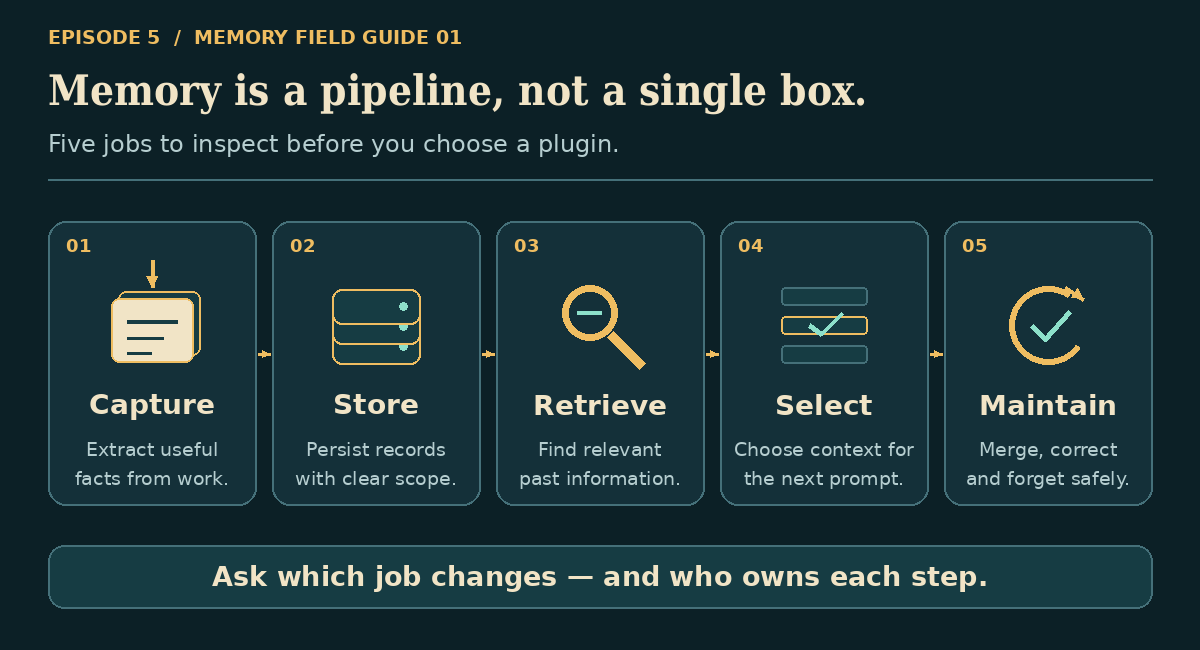
These are roles, not mutually exclusive product categories. Several plugins span multiple roles. Nor is a graph automatically better than vectors: the storage structure and the retrieval algorithm are separate choices.
Improve the native foundation
1. AutoDream — turn fragments into maintained notes
AutoDream 1.0.6 synthesizes eligible sessions and native memories into scoped Markdown notes, then synchronizes its notes back into native vector memory. It uses the utility model and needs native memorization enabled.
Strong point: inspectable files, provenance, validation before mutation and archives of replaced content. Choose it when useful lessons are scattered across conversations.
Trade-off: autonomous model-written consolidation, not an approval queue or whole-database deduplicator. It does not delete every original fragment it learned from. Archives preserve history; they are not forgetting. Its default two-hour/two-session gate is checked after eligible response chains—not an independent alarm clock.
2. Memory Hardening — resilience, with version-sensitive limits
Memory Hardening 0.6.0 wraps native recall/wait behavior, adds diagnostics and clamps large memorization histories. It is for people experiencing failures, not those seeking richer facts.
Strong point: targeted guards and observability without editing core files.
Trade-off: runtime patches still depend on the exact framework. Some advertised protections are incomplete: breaker/rate-limit flags have no native consumers in the reviewed baseline, and cooperative cancellation is not guaranteed termination. Validate the specific protection you need. Restart when testing a clean baseline after removal; not every patch is restored by cleanup.
3. Reranker — choose better evidence from existing candidates
Reranker 1.0.2 expands native similarity-search candidates, sends query/document pairs to a scoring endpoint, then returns the requested number in a new order. It does not rewrite stored facts.
Strong point: a focused answer to “the right memory exists, but irrelevant hits win.” Shadow mode lets you score without applying the new ordering.
Trade-off: you supply the server/model; queries and memories reach that endpoint. Shadow mode still costs time. There is no built-in API-key header support, and protocol probing can exceed one request timeout. Start with a trusted compatible endpoint and measure latency before switching live.
4. Auto Save Memory — an extra writer, not free intelligence
Auto Save Memory 1.0.0 extracts decisions, facts, preferences and other insights after a response and inserts them into native memory using the utility model.
Strong point: straightforward background capture without requiring an explicit save tool call.
Trade-off: native memory already extracts information. This extra writer has no database deduplication or supersession check and rereads overlapping history. Its interval is tied to loop iteration, not a dedicated turn counter. Turning off native automatic memorization does not stop this writer. Use it only after demonstrating a capture gap, then inspect duplicates.
5. Knowledge Upload — convenience, not a memory engine
Knowledge Upload 1.0.0 adds a chat button that calls Agent Zero's existing knowledge interface.
Strong point: quick access to document management, without another store, model or service.
Trade-off: ingestion and indexing remain native responsibilities. If the expected UI function is unavailable, the button cannot supply them. Choose it for fewer clicks—not improved recall quality. It is the least conceptually complicated companion to a native-memory setup.
Local notes, history and relationships
“Local storage” below does not mean all processing stays local: extraction may use your configured cloud utility model.
6. Tree Ring Memory — deliberate memory with provenance
Tree Ring Memory 3.4.2 connects Agent Zero to a Rust memory CLI, with explicit scope, receipts and lifecycle concepts such as rings, scars and heartwood. See our Tree Ring explainer for the underlying model.
Strong point: accountable, selective capture rather than indiscriminate transcript storage. The reviewed bridge proposes a capture checkpoint; the agent must use its strict capture tool. Cross-project and sensitive recall default off.
Trade-off: compatible CLI version and project activation are prerequisites. It is an independent store, not a transparent replacement for native tools. Do not confuse agent-mediated capture with a guaranteed background recorder. Choose it for curated, explainable project memory.
7. QMD Memory System — readable files, demanding integration
QMD Memory System 2.0.0 writes utility-model session summaries as Markdown, then uses Node-based QMD hybrid search with recency/diversity adjustments.
Strong point: portable, inspectable files and explicit search/browse tools. Requires Node/npm, QMD and local search models; GPU is optional.
Trade-off: this revision needs compatibility work before routine recommendation. Its recall/wait filenames duplicate native hooks; the reviewed loader normally selects native ones first. A simple “disable native recall” setting does not remove those files. Setup is also split across lifecycle and manual initialization, while concurrent filenames and scope routing need care. Attractive architecture; verify integration before relying on automatic recall.
8. Memex — conversation history plus personalization
Memex 0.1.0 combines SQLite full-text session search, portraits, recall nudges, skill learning and pre-compaction snapshots. Several features explicitly use native memory helpers.
Strong point: broader continuity without operating another database service. Useful when you need “what happened in that conversation?” as well as durable facts.
Trade-off: many automatic features default on, bringing extra model work and retained transcripts/preferences. The portrait store is global despite scoped settings. Its native-format-dependent reranking is not a universal adapter for other backends. Start with session search; add portraiture or skill learning only when you want those behaviors.
9. Mnemograph (Graph Memory) — entities and connections
Mnemograph 2.0.0 extracts entities and relationships into SQLite, then adds graph context alongside native memory. No separate graph server is required.
Strong point: explicit people/project relationships, aliases and inspectable structure rather than isolated text chunks.
Trade-off: the indexed revision contains a manifest/import/config naming mismatch—graph_memory versus _graph_memory—that appears to obstruct standard installation. Its database is not project-isolated, and retrieval can fall back to generic top entities. Treat this as a promising specialist requiring a compatibility check, not a proven plug-and-play recommendation. Graph structure alone does not establish better answers.
10. Ladybug Memory — local graph storage, simpler retrieval
Ladybug Memory 0.1.0 stores extracted memories and topic connections in an embedded Ladybug database. Project isolation defaults on; its capture and recall can operate independently of native memory.
Strong point: local project workspaces, visual exploration and no separate database server. Requires the Ladybug package and utility-model processing.
Trade-off: current recall scores words/substrings across the newest 250 records. It is not vector search or relationship traversal; older relevant entries can fall outside that window. Native and Ladybug capture can duplicate facts. Export first: this revision's uninstall hook deletes project Ladybug workspaces.
Memory beyond one Agent Zero instance
Service-backed plugins introduce another operational layer: endpoint availability, credentials, backend models, retention and potentially separate charges. A free plugin does not make its infrastructure free.
11. AgentMemory — service-backed session continuity
AgentMemory 0.5.0 sends session context, prompts and tool observations to an AgentMemory REST daemon, with tools for relations, slots and coordination.
Strong point: richer session/work continuity beyond a single vector store.
Trade-off: broader raw-data capture and another service to operate. Container-local auto-start does not manage the default Docker host endpoint; verify where the daemon actually runs. Provisioning is not fully handled by standard lifecycle hooks in this revision. It can also observe other memory tools' outputs and store them again. Choose it when the daemon's workflow features justify that complexity.
12. Honcho Conversational Memory — understand the person
Honcho 2.0.0-beta.2 sends primary-user messages and final responses—not every tool trace—through a masked, durable SQLite outbox to Honcho. It retrieves conversational context and offers explicit remember/forget/search/ask operations.
Strong point: user understanding across sessions and clients, with retryable delivery rather than fire-and-forget capture.
Trade-off: hosted defaults require credentials; self-hosting needs endpoint configuration and infrastructure. Queued content remains local, backend processing remains a separate privacy decision, and recall can add latency. Project visibility filters do not create separate peer representations. Choose it for continuity about a person, not strict multi-tenant separation.
13–14. Two Hindsight plugins: same backend family, different operators
Both connect to a separately deployed Hindsight service for retention and retrieval. Neither suppresses native memory. They are alternatives, not two halves of a required installation.
| Hindsight Memory — Jehu | A0_Hindsight Memory — neurocis | |
|---|---|---|
| Reviewed source | 0.4.1: a0hindsight |
2.5.7: a0_hindsight |
| Main appeal | Explicit tools, context/hybrid modes, bank and latency controls | Automatic fact extraction plus reflective context |
| Capture | Recent conversation text with basic redaction | Utility-model-extracted memory strings |
| Client requirements | Standard-library HTTP; no Hindsight SDK | Hindsight client package plus A0 utility model |
| Reflection | Explicit Reflect tool | Automatic reflection enabled by default |
| Strong point | Operator control, cache/circuit safeguards | More automatic synthesis alongside native recall |
| Weak point | Default prefetch uses previous-call results; redaction is not full data-loss prevention | Extra model processing; failed writes can still advance the retention cursor |
Choose Jehu when you want to control retrieval modes and banks. Its memory_mode: off does not stop retention: turn off retention separately or disable the plugin.
Choose neurocis when automatic extraction/reflection is the point. Start with a small recall budget and verify writes actually reach the backend. Both need working service credentials/networking as appropriate; backend inference costs remain deployment-specific. Their default bank names differ, so enabling both does not magically share memories.
15. Cognee Knowledge Memory — graph-backed knowledge, check readiness
Cognee Knowledge Memory 1.5.0 intends to retain material in project-derived Cognee datasets and retrieve graph-backed context alongside native memory.
Strong point: potentially useful if you already operate Cognee and want its knowledge processing available to Agent Zero.
Trade-off: a compatible server and its model configuration are required. Actual initialization expects username/password, not simply the README's optional API-key setup. Plugin-local helper imports and inconsistent config IDs raise substantial compatibility concerns in this revision. Extraction failure can fall back to raw history. Resolve those issues before trusting automatic capture; this review does not establish a working deployment.
16. Open Brain — reuse your shared thought store
Open Brain 1.0.0 exposes capture/search/recall/digest tools over an existing OB1 Supabase/pgvector store, using OpenRouter for embeddings and metadata extraction.
Strong point: a common thought collection across AI clients, with structured metadata and source filters.
Trade-off: schema, RPC functions, credentials and funded model access are prerequisites. “Auto-capture” is a skill instructing the agent, not guaranteed lifecycle execution; its behavior toggles are not enforced by Python capture hooks. Default service-role credentials bypass database row-level security. Choose it for an existing shared OB1 workflow, not as a zero-setup recorder or an authorization boundary between clients.
Do combinations make sense? Yes—different jobs, clear ownership
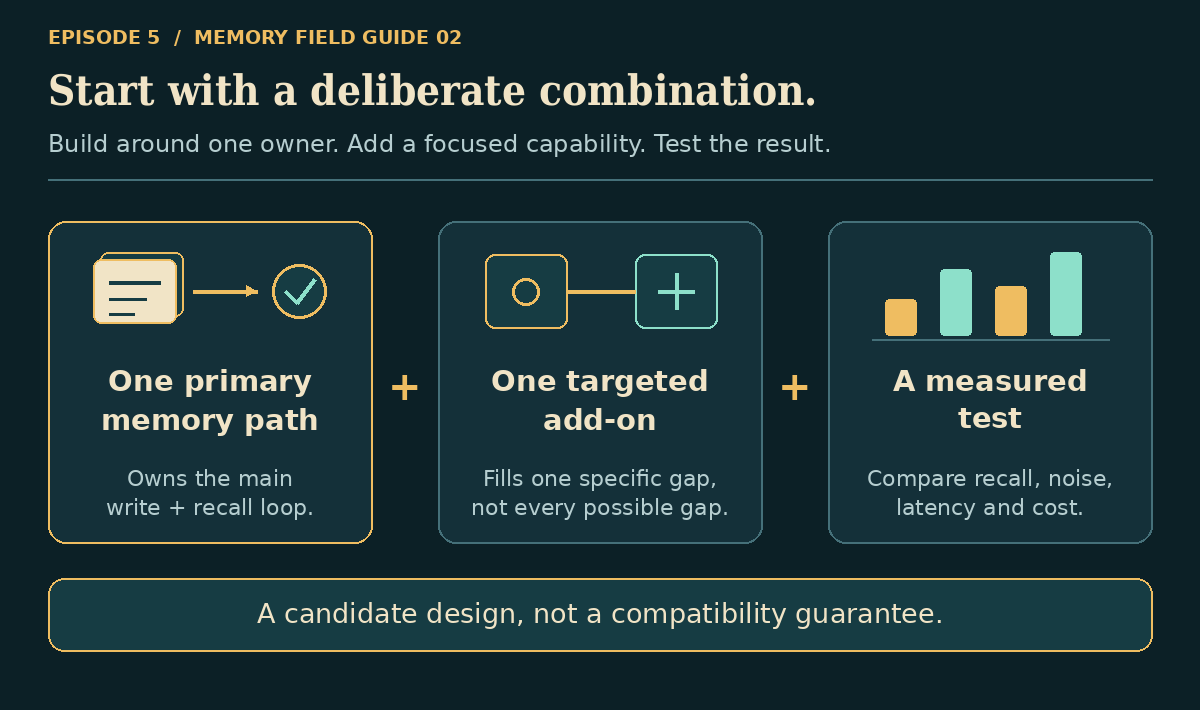
These are source-informed candidates, not tested compatibility certifications. Keep one clear owner for each capture/retrieval job; an independent store does not automatically replace native tools or migrate existing memories.
| Candidate combination | Why it makes sense | Condition before keeping it |
|---|---|---|
| Native + Knowledge Upload | Same knowledge backend, easier UI access | Confirm a file becomes searchable |
| Native + Reranker | Better selection without another writer | Shadow-test relevance and total recall latency |
| Native + AutoDream | Maintained notes built from existing experience | Inspect provenance, duplicates and retained archives |
| Native + Memex session search | Durable facts plus searchable conversation history | Disable overlapping extras you do not need; check portrait scope |
| Native + one of Honcho/Hindsight/Open Brain | Local task memory plus a defined shared-memory role | Separate capture responsibilities and verify actual data visibility |
| Tree Ring + native reference knowledge | Curated project lessons plus document retrieval | Distinguish what each stores; inspect combined prompt size |
Once one addition earns its place, AutoDream plus Reranker on native memory is a plausible next experiment: synthesis and selection address different failures. But the scorer also affects AutoDream's native searches, so latency and failure behavior need retesting.
Avoid installing both Hindsight integrations “for more memory.” Avoid adding Auto Save on top of every other extractor. And do not stack QMD, native recall and Memex's reranker assuming matching terminology means compatible hooks.
The reviewed extension loader selects the first occurrence of a filename: one plugin's hook can hide another's. Even with different filenames, plugins can overwrite the same context slot—or append contradictory copies. “Both enabled” proves neither interoperability nor useful recall.
Install one. Prove it. Then decide
Use Agent Zero's plugin manager to find the exact name and author, inspect its README/configuration and consider a security scan before installation. Let supported lifecycle hooks perform setup; a README asking you to bypass required setup with Execute is a compatibility issue to resolve, not a universal ritual.
Configure endpoints, models and credentials before enabling automation. Do not assume a project-level toggle means project-isolated storage. Back up native memory and any independent store; verify what uninstall actually deletes.
Then run this small experiment in disposable projects:
- Baseline: save ten synthetic facts, including one relationship and one preference. Start a fresh chat and ask paraphrased questions.
- Correction: reverse one fact. Ask again; an old answer presented confidently is a failure.
- Scope: ask from a second project that should not see those facts.
- Deletion: forget one fact in every relevant store; confirm it does not return through a second backend or retained archive.
- Cost: compare useful answers, wrong recalls, response time and model usage before/after. Inspect retrieved evidence, not just fluent answers.
Use identical questions and data for each candidate, change one variable at a time, and keep a known-good backup. Ten facts are a smoke test, not a performance benchmark—but they expose more than a successful connection badge.
Our recommendation: ordinary task memory? Start native. Buried evidence? Try Reranker. Scattered lessons? Consider AutoDream or deliberate Tree Ring capture. Conversation continuity? Examine Memex or Honcho. An existing external memory service? Choose its integration after checking compatibility.
The best memory plugin is not the one that remembers the most. It is the one that helps your agent recall the right evidence, in the right scope, without making yesterday's mistakes permanent.
Sources and scope
Reviewed September 22, 2026. All sixteen plugin links above pin the Plugin Index revisions inspected: README, manifest, defaults and relevant implementation. Native baseline: commit b1cbd1f. Compatibility concerns are static source findings, not reproduced production failures; no plugins were installed, no external memory services were exercised, and no comparative quality or speed benchmark was performed. Check newer releases for fixes before deciding.
Artwork is original, with the genuine Agent Zero mark; diagrams explain roles rather than imitate product screenshots. Continue with Projects, Self-Improvement or A0 Swarms.